I have a Power BI report that has an embedded Power App visual. The Power App serves as a write back. The Power App screen has a gallery, being fed data via PowerBIIntegration.Data and some SharePoint Lists.
The Power BI visual/ Power App utilizes custom sizing, 950 width x 300 height which is set in both the Power App's settings, as well as the viewed screen within the application
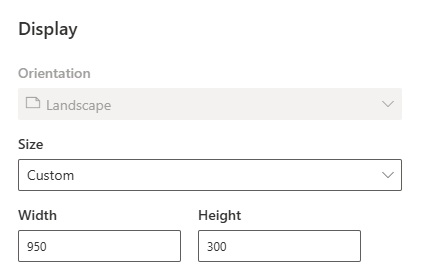
In the viewed screen is a gallery, displaying data from the Power BI report. The gallery is a write back app.
Inside the gallery is a drop down box. Issue is when I click on the drop down's chevron, Power Apps renders the selection box beyond the app screen

Its cutting off the top few selection's from being seen in the Power BI visual, I can still select using the cursor keys and have no idea which item cursor is on:
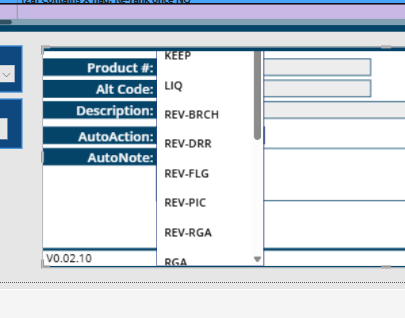
Doing a Google search I have tried :
turning OFF the "Scale to Fit" in settings & save/publish,
turning ON the "Scale to Fit" and ON the "Lock aspect ratio" & save/publish,
turning ON the "Scale to Fit" and OFF the "Lock aspect ratio" & save /publish
set the dropdowns Y value so its on the bottom of the screen via Screen.Height - DropDown.Height
set the Y value to 0 so it's at the top of the screen
Change the DropDown.Size to a lower value hoping a small font size would work (smaller fonts also aren't easy on the eyes in the Power Apps visual render)
Copilot tells me to turn OFF "Scale to Fit" and ON "Lock aspect ratio" which is not a valid selection, as "Lock aspect ratio" is auto greyed out when "Scale to fit" is turned ON
I know there are a lot of items to chose from, this is a requirement so I can not shore up the available item list.
So how do I force Power Apps to render the drop down selection box to the boundaries of the App's height?


 36
36








 Share
Share Report
 All responses (
 Answers (






