web
You’re offline. This is a read only version of the page.
close
Skip to main content

Announcements

News and Announcements icon
Community site session details

Community site session details

Session Id :
Power Platform Community / Forums / Power Apps / Can't see the "Data" o...
Power Apps
Answered

Can't see the "Data" option at the left bar menu

(0) ShareShare
ReportReport
Posted on by 11
Hi! I'm building some apps in my company and I can connect to several data connectors, create and delete those connectors, no problem with that, But, one I'm in the app I cannot manage the data tables, delete, nothing, just use them, and I not able to see the "Data" option at the left bar menu, where we have the Tree, media, variables, etc...  

And the data tables start to pile to much, app getting slower, etc, due that I cannot delete the tables. Someone could tell me whats happening and how to solve it pleasE???
I'm connecting to Busines Central BTW
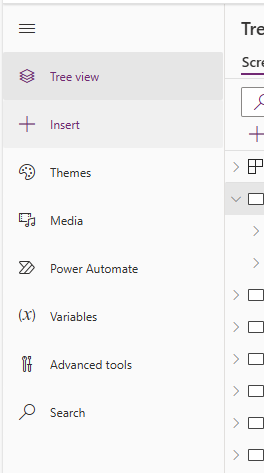
dataError.png
I have the same question (0)
  • realwillwright Profile Picture
    772 Moderator on at
    Hi,
     
    What version of studio are you using?
  • Suggested answer
    Ravindra Jadhav Profile Picture
    342 Moderator on at
    Hii, 
    Upgrade the version of your app.
    Or at Top ribbon you can see the insert data, you can use that option as well


    Please Closed the Question, Mark it Solved 
     
    If my answer helped resolve your issue, please consider marking it as solved to assist others facing the same problem. Additionally, giving it a like would be greatly appreciated and motivates us to keep helping
     
    Thank You
    Ravindra Jadhav
  • CA1105 Profile Picture
    545 Moderator on at
    Following to see the solution
  • PE-24071326-0 Profile Picture
    11 on at
    The version I'm using is:
    3.24092.15
  • Verified answer
    PE-24071326-0 Profile Picture
    11 on at
    Hi Community, I finally saw that the problem was not having a proper license when I create the app, then I got assigned to a premium plan and the next apps come with the Data field and management, thanks everyone!!

Under review

Thank you for your reply! To ensure a great experience for everyone, your content is awaiting approval by our Community Managers. Please check back later.

Helpful resources

Quick Links

Introducing the 2026 Season 1 community Super Users

Congratulations to our 2026 Super Users!

Kudos to our 2025 Community Spotlight Honorees

Congratulations to our 2025 community superstars!

Congratulations to the March Top 10 Community Leaders!

These are the community rock stars!

Leaderboard > Power Apps

#1
Vish WR Profile Picture

Vish WR 762

#2
11manish Profile Picture

11manish 640

#3
Valantis Profile Picture

Valantis 548

Last 30 days Overall leaderboard
