Hi All.
The Q&A forum suggested that I raise this here. There are plenty of cases where people want to return dates in empty/null fields but I need the reverse, if the field is empty I need it to remain so in the extract so we can report reality.
I am using Excel to extract data from Project Web Access using Power Query.
I can connect to the PWA database without any issues and extract/manipulate extracted data as I want.
However, when planning projects, our project managers leave task dates blank until they have enough information to populate these fields. If I use Project's built in reports this behaves as expected and the dates are left blank. However, when I extract using Power Query, the data source is populated with a date, often, but not always the task's creation date, into what should be an empty/null/whatever blank field.
This is visible in the preview, so the problem isn't when the data hits Excel.
Here's a screenshot of what the fields I'm interested in look like in Project:
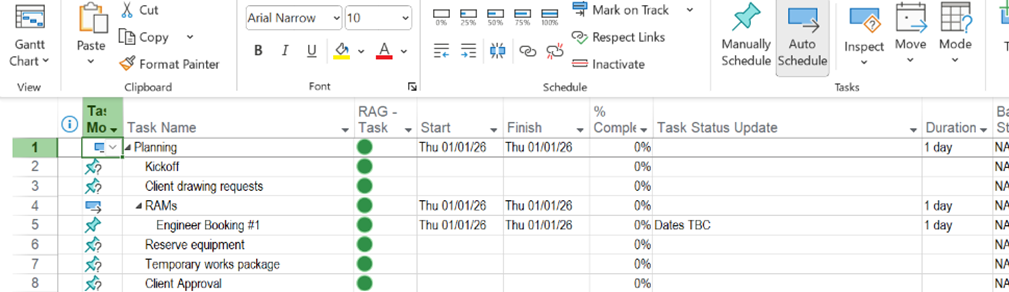
As you can see, some dates are missing as the project manager doesn't know what they will be yet until they have finished planning.
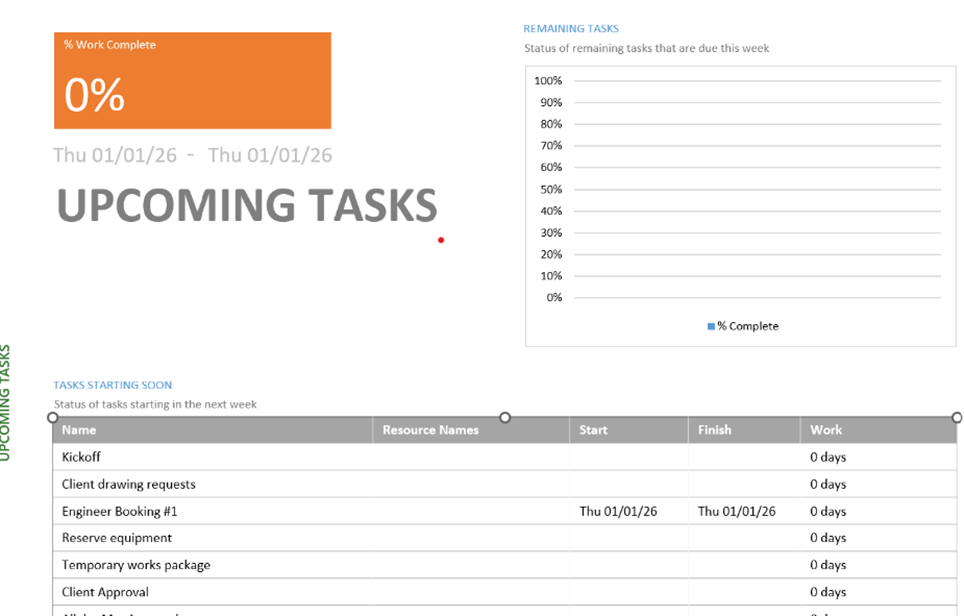
If you run a report from Project it shows the blanks. For example:
But when I run Power Query, I see this:
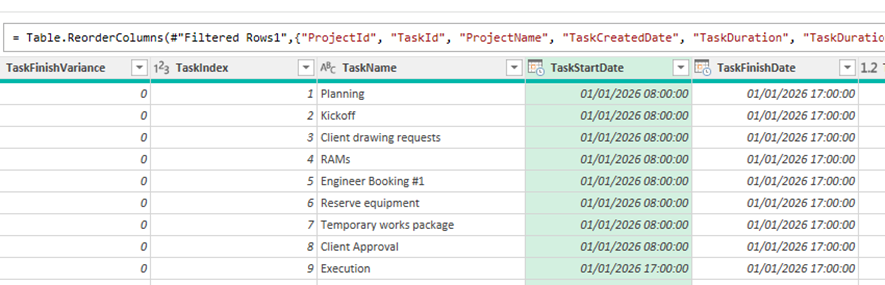
Note that it has assumed that all of the start and finish dates are the same as the Engineer Booking #1 task - except Execution, but that's a summary task - although this has blanks in it which have been auto-populated. The latter is probably another manifestation of the problem I expect.
Given Project's less than great reporting tools, we need to manipulate the data elsewhere so any help much appreciated!


