web
You’re offline. This is a read only version of the page.
close
Skip to main content

Notifications

Announcements

Community site session details

Community site session details

Session Id :
Power Platform Community / Forums / Power Apps / ComboBox default selec...
Power Apps
Answered

ComboBox default selected items from a collection doesn't work

(0) ShareShare
ReportReport
Posted on by

Hello everyone.

I'm having troubles loading defaults into a combobox, from a collection.

I have a ComboBox that's defined like this:
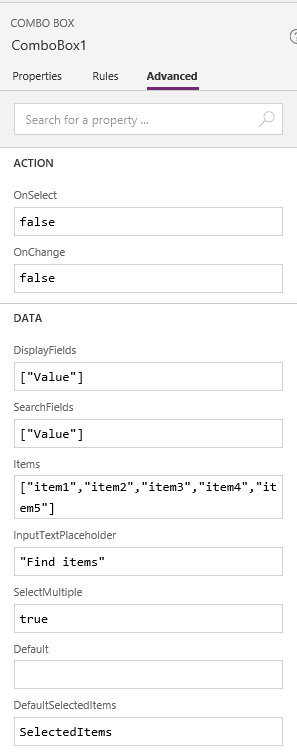
The SelectedItems is a collection that's collected by calling


ClearCollect(SelectedItems,ComboBox1.SelectedItems);SaveData(SelectedItems, "SavedSelectedItems");

So it's expected that when the SelectedItems collection isn't empty, it will have those entries selected as default.


However, this is only partly working.


The preview of the ComboBox looks fine, like this:

However, when you press it, the items aren't actually selected.
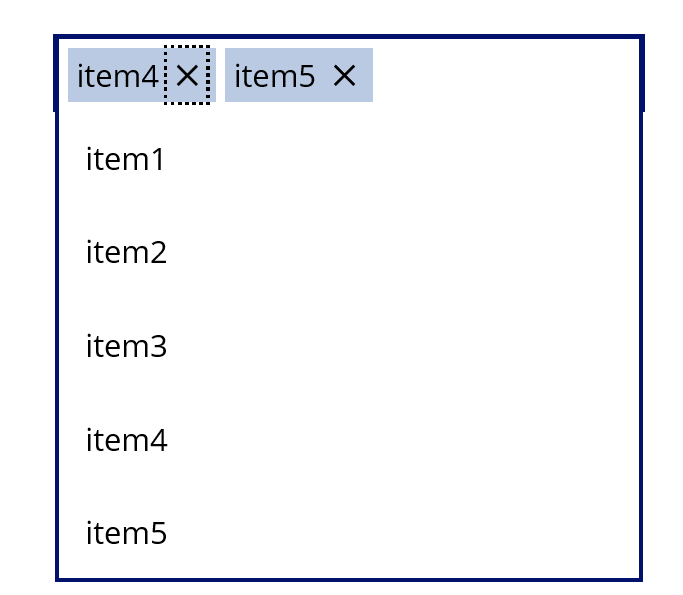
What am I doing wrong?
I uploaded a simple reproduction project and attached to this topic, if you want to try it out and see what I mean.


Thanks


Categories:
I have the same question (0)
  • v-xida-msft Profile Picture
    on at

    Hi @Anonymous ,

    Based on the issue that you mentioned, I think you have some misunderstanding with the DefaultSelectedItems property of the ComboBox control.


    The DefaultSelectedItems property of the ComboBox control is used to set a Default value within the ComboBox control. But the Default value just be displayed within the ComBoBox, rather than select corresponding values from the ComboBox available options and display it.


    In other words, the Default value just be used as a Display value within the ComboBox, which would not be recognized that you selected corresponding values from the ComboBox available options.


    Best regards,

  • Community Power Platform Member Profile Picture
    on at

    Thank you.

    So just to clarify is it not possible having a ComboBox that has some items selected by default?


  • Verified answer
    v-xida-msft Profile Picture
    on at

    Hi @Anonymous ,

    Could you please share a bit more about your SelectedItems collection?


    I have made a test on my side, and found that there is something issue with the value you typed within the DefaultSelectedItems property of the ComboBox.

    Please take a try with the following workaround for more details:4.JPG


    5.JPG

    Set the DefaultSelectedItems property of the ComboBox to following:

    ForAll(
     SelectedItems,
     {
     Value: Value
     }
    )

    On your side, please consider take a try to set the DefaultSelectedItems property of your ComboBox to following:

    ForAll(
     SelectedItems,
     {
     Value: Value
     }
    )

    then check if the issue is solved.


    Best regards,

  • infoman Profile Picture
    7 on at

    In your DefaultSelectedItems field place an array value. i.e. Use brackets notation [fieldname]

    e.g. For a collection field called 'amount' just put [amount] in the default selected field.

  • sasigouru Profile Picture
    47 on at

    @infoman Hi,


    Can you elaborate please? I've a collection which is storing the selected items from a combobox control. That is fine. However, when i'm trying to default the selected items, it's throwing an error. I tried wrapping the column name from the collection in square brackets. But it didn't work.


    Much appreciated if you can share more details.


    Thanks,

    Sasi.

  • ramanujama Profile Picture
    51 on at

    It is really simple.
    Example you have an Employee table with columns: Id, Name

    Suppose you have created a Combobox for email and selected A, B, C and saved it in database. When you load the page or comes again, you want those items to be selected as default, use below formula:

    DefaultSelectedItems = Filter(Employees, Name in Split(EmailList,","))

    Note: EmailList is coming from database (previously saved value)

    Above formula selects items in combobox as well.

  • Community Power Platform Member Profile Picture
    on at

    It will work on multiple selection =true or false both Filter(ListName, Columnname in Parent.Default)

  • JHS2019 Profile Picture
    30 on at

    It does not with the code for me and I don't understand why not. 


    Mine is a lookup column11_1.PNG

  • leo_1221 Profile Picture
    3 on at

    Excellent!! 

  • jed76 Profile Picture
    on at

    Hi

    I wonder if you can help?


    I have a similar issue with defaultselecteditems in a Combobox which sits inside a gallery. The items of the gallery is a Dataverse table. Whenever I set defaultselecteditems to {Value: ThisItem.Name} the item will display in the box but Powerapps thinks the control is BLANK until I re-select the item in the combobox again???

Under review

Thank you for your reply! To ensure a great experience for everyone, your content is awaiting approval by our Community Managers. Please check back later.

Helpful resources

Quick Links

Forum hierarchy changes are complete!

In our never-ending quest to improve we are simplifying the forum hierarchy…

Ajay Kumar Gannamaneni – Community Spotlight

We are honored to recognize Ajay Kumar Gannamaneni as our Community Spotlight for December…

Leaderboard > Power Apps

#1
WarrenBelz Profile Picture

WarrenBelz 479 Most Valuable Professional

#2
MS.Ragavendar Profile Picture

MS.Ragavendar 268 Super User 2025 Season 2

#3
Kalathiya Profile Picture

Kalathiya 248

Last 30 days Overall leaderboard



