web
You’re offline. This is a read only version of the page.
close
Skip to main content

Notifications

Announcements

Community site session details

Community site session details

Session Id :
Power Apps
Suggested Answer

Open Item Gallery.

(1) ShareShare
ReportReport
Posted on by 6
Hi, Power Apps Community Members. 
 
I'm trying to offer to Users the possibility to choose which Excel Spreadsheet file they want to open in my PA Application.

This way, I included the Excel Spreadsheets file names (which were imported into the PA Application) and I'm showing them in a Gallery List.

When the User selects an Excel Spreadsheet file name which wants to open, I save into a variable and include this variable in the Gallery Option called Item.

But, I received a error message saying that it isn't a Table Name.

So, my question is if someone already had tried to do it and if also had faced this same problem, and of course, if the solution had been found.
 
Thank you in advance for reply.
Altino.
Categories:
I have the same question (0)
  • w.p Profile Picture
    8,339 Super User 2025 Season 2 on at
    Make sure you format the table, it will be generated automatically. You can also rename it.
  • CU22041910-0 Profile Picture
    6 on at
    Hello, W.P..
     
    This answer doesn't fit to my problem.

    Adding new info, when I insert the first letters (in the Gallery Option called Item) of the Excel Spreadsheets file names, all Excel Spreadsheets file names are showing in an list and it is possible to choose one of them as the one you want to open.
     
    But as I've explained before, if I insert in the Gallery Option called Item the variable with the Excel Spreadsheet file name that I want to open (instead of to choose in the list), the same error message (informing that it isn't a Table Name) appears.
     
    Thank you again, in advance, for a new response that can solve this issue.
    Altino.
  • WarrenBelz Profile Picture
    153,079 Most Valuable Professional on at
    I think the confusion here is understanding exactly what you are doing here - where exactly are these Excel files (what do you mean by imported into the PA Application) or are the names paths to the actual locations of the files (external somewhere).
    You have also noted When the User selects an Excel Spreadsheet file name which wants to open, I save into a variable and include this variable in the Gallery Option called Item.
    If (I am guessing here) you have imported these as Tables into the App, then you need to display them in a Gallery based on the Table (they are no longer a spreadsheet) - or are you doing something else ?
  • Suggested answer
    ronaldwalcott Profile Picture
    3,847 Super User 2025 Season 2 on at
    Sounds as if you want to provide a facility to dynamically select an Excel spreadsheet for users to work with.
     
    This is not exactly possible as you are stating it even though it may be theoretically possible using a convoluted combination of flows and would be use case dependent.
    Anyway, a spreadsheet must be configured as a data source in the app. You cannot select a spreadsheet and dynamically configure it.
    Depending on your use case you could simulate the appearance of dynamic linking if you have a fixed finite selection of spreadsheets. You could create screens in the app linking to each spreadsheet navigated to by the user selecting the spreadsheet name. 
  • w.p Profile Picture
    8,339 Super User 2025 Season 2 on at
    Hi Altino
    Could you share screenshots and respond to the questions below, it will help us understand the issue better and find a solution.
  • stampcoin Profile Picture
    5,058 Super User 2025 Season 2 on at
     
    If your Excel files lives in SharePoint , for example Document. You can use Gallery in PA ( guess it's PA=Power App).
    See below : 
    The first picture: uses an icon, specify OnSelect = Lunch(ThisItem.'Link to Item').
     
     
    below one, uses HtmlText to cusomize the link a little bit.


    Enjoy Power Platform and have a great day 🚀 |  My LinkedIn

    If the answer helps, please consider 👍, Thanks.

     
  • CU22041910-0 Profile Picture
    6 on at
    RMK= Reply to Stampcoin, W.P, ronaldwalcott and WarrenBelz (and also others possible Power Apps Community Members) with some new approaches.

    Hi, Power Apps Community Members.

    ISSUE: I'm trying to offer to the Users the possibility to choose which Excel Spreadsheet file name they want to open in my PA Application.

    In the example image below, in the Data List of PA Application, the Excel Spreadsheets file names (which were imported into the PA Application as individual Tables from local OneDrive using the component OneDrive for Business), are Excel_1, Excel_2 and Excel_3.


    Then, I included in one Gallery called “Excel_List” all the Excel Spreadsheet file names in order to available the possibility to the User for choosing which Excel Spreadsheet file name they want to open).

    When the User chooses, the Excel Spreadsheet file name he or she want to open (browsing the Gallery called “Excel_List”), I save into a variable (called EXCEL_NUMBER_SELECTED) the Excel Spreadsheet file number associated to Excel Spreadsheet file name selected and which must be open in one Gallery called “Excel_Data.

    If I work as common way, when I insert manually the first letters (in option called Item in the Gallery called Excel_Data) of the Excel Spreadsheets file names, all Excel Spreadsheets file names (which were imported into the PA Application as individual Tables from local OneDrive) are shown in one list and it is possible to choose one of them as the one I want to open without any problem (pls, see the image below).
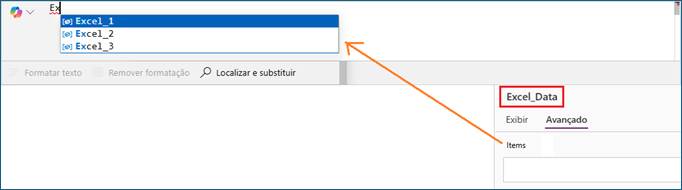

    But, if I insert in the option called Item (in the Gallery called Excel_Data) the variable name (EXCEL_NUMBER_SELECTED) with the Excel Spreadsheet file name that the User wants to open (and it was chosen before in the Gallery called Excel_List which has all imported Excel Spreadsheets file names) instead of selected by me and inserted manually the Excel Spreadsheet file name to be shown in this Gallery called Excel_Data, an error message is presented informing that it isn't a Table Name (“Valor Table esperado”= “Table Value expected”). Pls, see the image below.


    Even when I use the command called “Table”, and I include the variable name (EXCEL_NUMBER_SELECTED) between the parentheses, the same error continue to be shown.

    In this case, the command “LAUNCH” can’t help since it accesses an External Link (as I understood) and not a Table imported into the Application.

    But, if there is another command that could open Table imported into the Application, it will solve this problem.

    So, my question is if someone already had tried to do it and if also had faced this same problem, and of course, if the solution had been found.

    Thank you all in advance for your reply.
    Altino.
  • ronaldwalcott Profile Picture
    3,847 Super User 2025 Season 2 on at
    You cannot do what you are trying. The data source cannot be dynamically assigned.
    You could read the records assign them to a collection and have on screen with uses the collection and writes the data to the selected spreadsheet or you can have a screen for any spreadsheet and the user navigates to that screen based on the spreadsheet chosen.
     
    This part will not work
    But, if I insert in the option called Item (in the Gallery called Excel_Data) the variable name (EXCEL_NUMBER_SELECTED) with the Excel Spreadsheet file name that the User wants to open (and it was chosen before in the Gallery called Excel_List which has all imported Excel Spreadsheets file names) instead of selected by me and inserted manually the Excel Spreadsheet file name to be shown in this Gallery called Excel_Data, an error message is presented informing that it isn't a Table Name (“Valor Table esperado”= “Table Value expected”). Pls, see the image below. 
  • WarrenBelz Profile Picture
    153,079 Most Valuable Professional on at
    A suggestion - you could use three galleries, one for each Table and make the releant one visible according to the user's selection. Quite simply you cannot have a gallery with alternate tables as a data source.

Under review

Thank you for your reply! To ensure a great experience for everyone, your content is awaiting approval by our Community Managers. Please check back later.

Helpful resources

Quick Links

Forum hierarchy changes are complete!

In our never-ending quest to improve we are simplifying the forum hierarchy…

Ajay Kumar Gannamaneni – Community Spotlight

We are honored to recognize Ajay Kumar Gannamaneni as our Community Spotlight for December…

Leaderboard > Power Apps

#1
WarrenBelz Profile Picture

WarrenBelz 721 Most Valuable Professional

#2
Michael E. Gernaey Profile Picture

Michael E. Gernaey 320 Super User 2025 Season 2

#3
Power Platform 1919 Profile Picture

Power Platform 1919 268

Last 30 days Overall leaderboard



