web
You’re offline. This is a read only version of the page.
close
Skip to main content

Notifications

Announcements

Community site session details

Community site session details

Session Id :
Power Platform Community / Forums / Power Apps / How do I check if the ...
Power Apps
Answered

How do I check if the enabled dynamics option was enabled on Environment creation?

(0) ShareShare
ReportReport
Posted on by 696
Good morning, Braintrust.
 
I googled around for the answer and found some old posts on the forums saying look at resources, and Dynamics 365 app will list any dynamic apps installed.
 
 
Only problem is I could see the same apps listed on Environments I know did not have the option checked on creation.
 
Is there any way to tell if an Environment has the Dynamics Enabled?
 
Thank you
RD
I have the same question (0)
  • Verified answer
    AlbertoCastro Profile Picture
    1,201 Most Valuable Professional on at
    Hi @RandonDept,
    There is no way to identify if an environment is prepared to install Dynamics 365 apps.

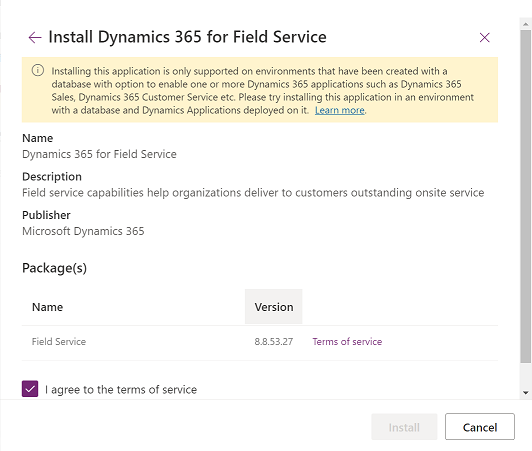
    When you try to install a Dyn365app in a environment and you have this error obviously is not enabled:
    Installing this app is only supported on environments that have been created with a database with option to enable apps.
    https://learn.microsoft.com/en-us/power-platform/admin/manage-apps?WT.mc_id=ppac_inproduct_resources#troubleshooting-installation-error

    ---------------------------
    If the solution works, please kindly ✅ check the box "Does this answer your question?" on the bottom left! This will help others in finding the solution more expediently 😄 Also, a Like would be a great compliment!
     

Under review

Thank you for your reply! To ensure a great experience for everyone, your content is awaiting approval by our Community Managers. Please check back later.

Helpful resources

Quick Links

Forum hierarchy changes are complete!

In our never-ending quest to improve we are simplifying the forum hierarchy…

Ajay Kumar Gannamaneni – Community Spotlight

We are honored to recognize Ajay Kumar Gannamaneni as our Community Spotlight for December…

Leaderboard > Power Apps

#1
WarrenBelz Profile Picture

WarrenBelz 739 Most Valuable Professional

#2
Michael E. Gernaey Profile Picture

Michael E. Gernaey 343 Super User 2025 Season 2

#3
Power Platform 1919 Profile Picture

Power Platform 1919 268

Last 30 days Overall leaderboard