Hi,
Let me add some more information on last answer provided. Your dependencies are coming from a PowerPages solution. You can start with installing PowerPages on your target environment and revalidate dependencies.
When you want to deploy your application in another environment, you need to work with Solutions. Before behind able to deploy anything, you need to regroup everything related to your app into a solution. Get to: make.powerapps.com. Then,
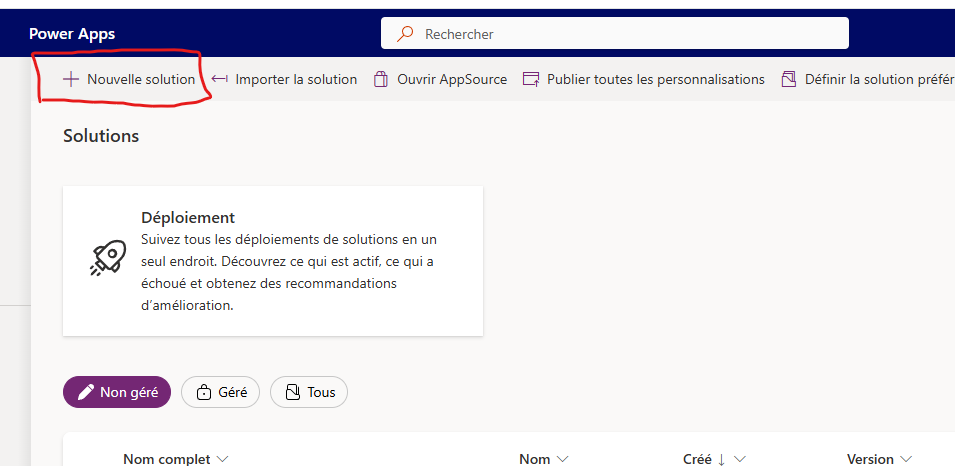
You will have a brand new solution in unmanaged solutions tab:
Then, you need to:
-Add every components related to your app (Application, tables needed in your app with their relationship tables, workflows, flows, etc);
-Publish all customization;
-On '...' beside your new solution, you select 'Export solution':
-Make sure you let the 'search for dependencies' process validates everything is ok (if not, add dependencies components needed);
-Choose between managed and unmanaged exportation (depending on the environment you want to deploy, you can simply export as unmanaged and managed, which is a good practice);
-Wait for the file to be created;
-Download the file;
-Go to your target environment;
-Select 'Import solution':
-Then, go pick your newly package file (<solutionName>.zip);
-Follow steps on the screen;
-If you get error, download the log file and apply fix and go back to step 2 (add component to your solution);
-If it works, simply click on 'Publish all customization' if you are on a managed environment.
Basta!
I hope it helps!
_______________________________________________________
Please click Does this answer your question if my post helped you solve your issue. This will help others find it more readily. It also closes the item. If the content was useful in other ways, please consider giving it a Like.







