Microsoft Copilot Studio enables organizations to extend conversational agents using REST API tools defined via OpenAPI specifications. While native Dataverse connectors are ideal for internal CRM operations, REST tools become essential when CRM must integrate with external, real-time systems such as financial services, tax engines, or enterprise platforms.
This blog demonstrates how a CRM Copilot agent can leverage REST APIs to retrieve external financial data, perform reasoning, and support business decisions within conversational workflows.
Business Use Case
A Sales CRM environment needs real-time exchange rate data that is not stored within Dataverse. Sales users want to:
- Convert currency values dynamically.
- Compare currency strength for financial decisions.
- Convert opportunity values and update CRM records.
Exchange rates are external, dynamic, and frequently changing. Storing them inside Dataverse would require constant synchronization and maintenance. Therefore, invoking a real-time REST API ensures accuracy, reduces data redundancy, and keeps financial calculations up to date.
Implementation (Step-by-Step Guidance)
Step 1: Prepare OpenAPI Specification
Create an OpenAPI 3.0 specification defining the external Exchange Rate API endpoint that the Copilot agent will invoke.
For example:
- GET /latest/{base} – Retrieve real-time exchange rates based on base currency
- GET /convert – Convert a specific amount between currencies
The specification should clearly define:
- Server URL
- Path parameters (base currency, target currency)
- Query parameters (amount)
- Expected JSON response schema
This allows the Copilot agent to securely invoke external financial services in real time.
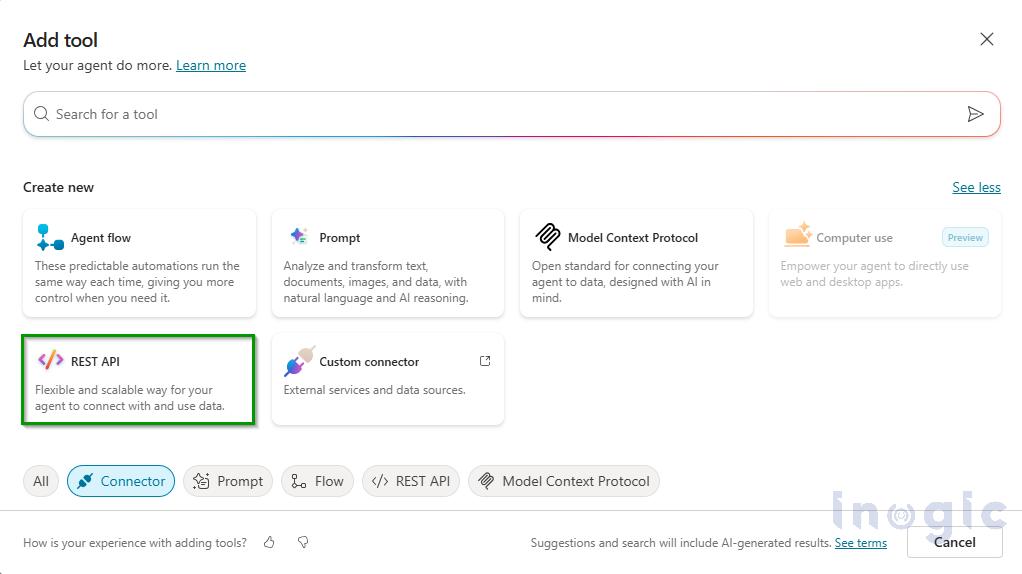
Step 2: Add REST API Tool in Copilot Studio
Navigate to Tools → Add Tool → REST API and upload the OpenAPI specification file.
Read More>>


