Microsoft Dataverse is widely used for storing and managing business data in Power Platform applications. In many real-world scenarios, developers need to integrate external applications, automate processes, or perform bulk data operations using Python.
In this blog, we will learn how to connect Python with Microsoft Dataverse using Azure App Registration and perform CRUD (Create, Retrieve, Update, Delete) operations through the Dataverse Web API using Python libraries like msal and requests.
Please find below steps to perform CRUD operation:
Step 1: Create App Registration on Azure Portal
Please find the link to create Azure app from Azure Portal.
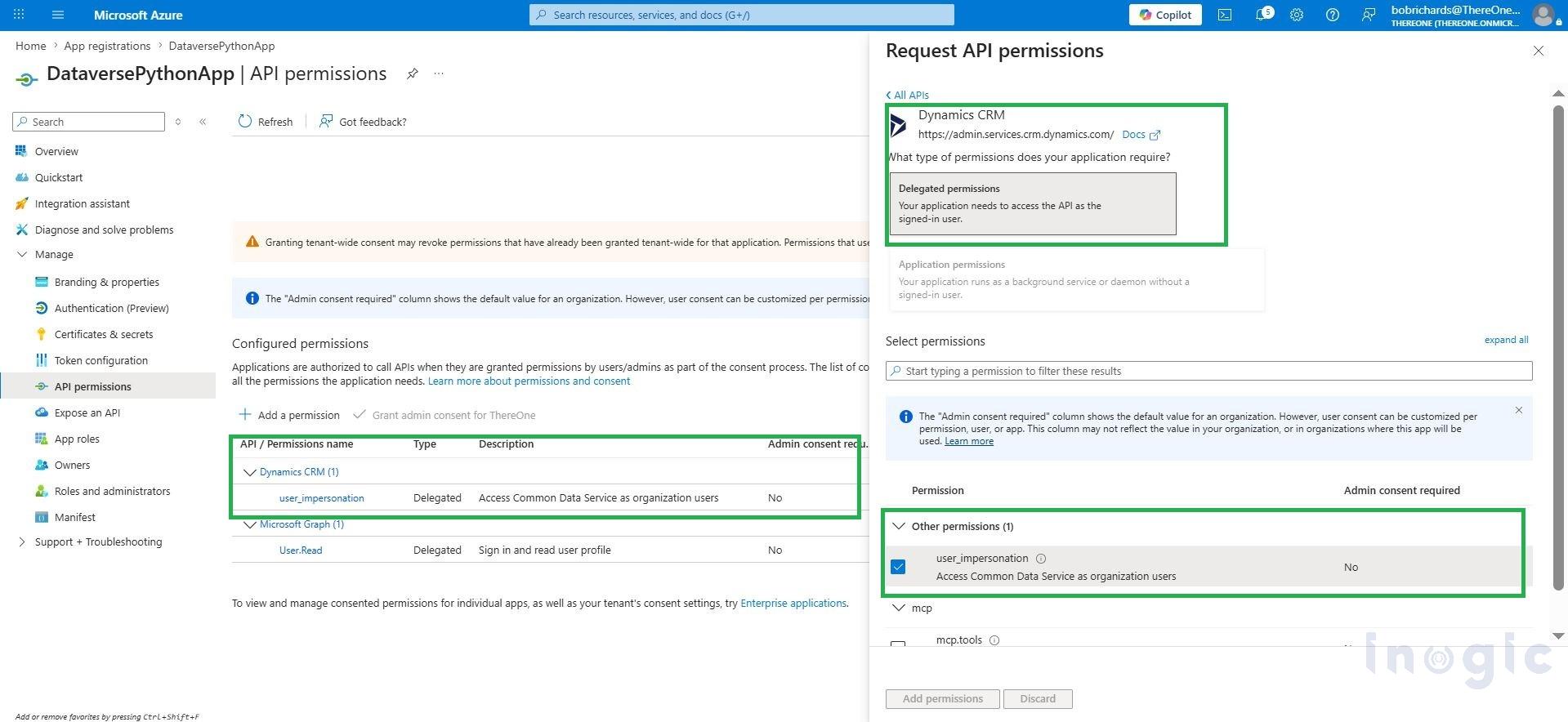
Step 2: Configure API Permissions to created Azure app
- Navigate to API Permissions > Add Permission > Apis my organization uses tab
- Add permission: Dynamics CRM
- Select: user impersonation
- Grant admin consent
This allows the application to securely access Dataverse data.
Step 3: Install Necessary Libraries and Connect CRM to Local Python
Install required libraries: pip install requests msal certifi
Python Code... Read More


