Logging time is nobody’s favorite part of the job. It’s repetitive, prone to mistakes, and usually eats up way more time than it should. But what if it didn’t have to be that way?
Thanks to Copilot in Dynamics 365 Project Operations, time entry just got a major upgrade. Whether you’re tracking hours or adding client-facing notes, Copilot helps you do it all faster, with fewer clicks and a lot less hassle.
In this post, we’ll walk you through how to turn on Copilot’s time entry feature, how it works, and why your team is going to love it.
Turn on Copilot for Time Entry
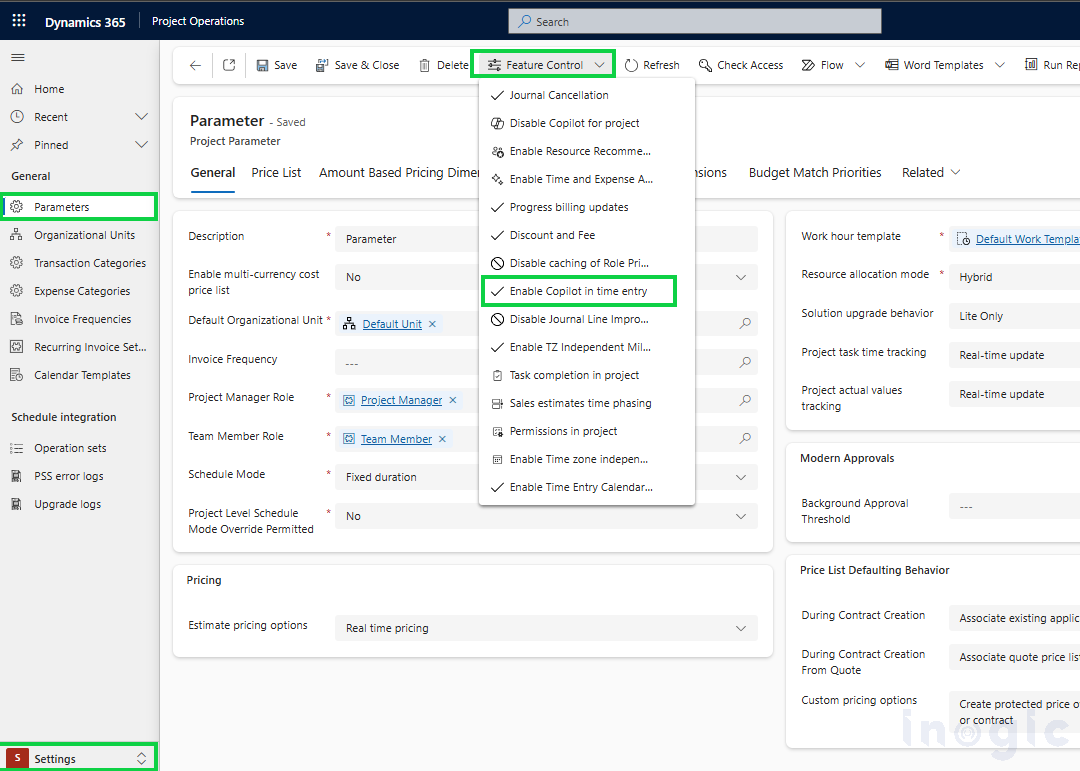
Getting started with Copilot for time entry is simple. Follow these steps to turn on the feature in your environment:
1. Open the Project Operations
2. Head to Settings > Parameters.
3. Inside the parameter record, click on Feature Control.
4. Find “Enable Copilot in time entry” and click Enable to turn on the feature.
Read More>>


