Organizations today store massive volumes of structured data sales figures, inventory records, and financial reports in Excel and CSV files across SharePoint libraries. When someone needs a quick insight from that data, the typical path involves downloading the file, opening it in Excel or Power BI, writing formulas or building visuals, and then sharing the result. It works, but it’s slow, manual, and requires a level of technical skill that not every team member has.
What if there was a way to simply ask a question and get the answer complete with accurate calculations and even a chart without ever leaving a chat window.
That’s the promise of Code Interpreter in Microsoft Copilot Studio. This preview feature allows Copilot Studio agents to go beyond simple Q&A by dynamically generating and executing Python code to analyze structured data files. When paired with a SharePoint Document Library as a knowledge source, it creates a powerful self-service analytics experience: users ask questions in plain English and the agent does the heavy lifting searching SharePoint for the right file, writing the code, running the computation, and delivering the result.
In this blog, we’ll explore what Code Interpreter is, how it works with SharePoint, and see it in action.
Code Interpreter is a capability within Microsoft Copilot Studio that enables AI agents to generate and execute Python code on the fly in response to user queries. Rather than relying solely on the large language model’s inherent reasoning which can be unreliable for math and data-heavy questions Code Interpreter offloads analytical tasks to deterministic Python computations.
The agent doesn’t estimate the answer. Instead, it writes a precise Python script, runs it against the actual data, and returns the calculated result. The math is real. The answer is accurate. And the user never sees a single line of code unless they choose to.
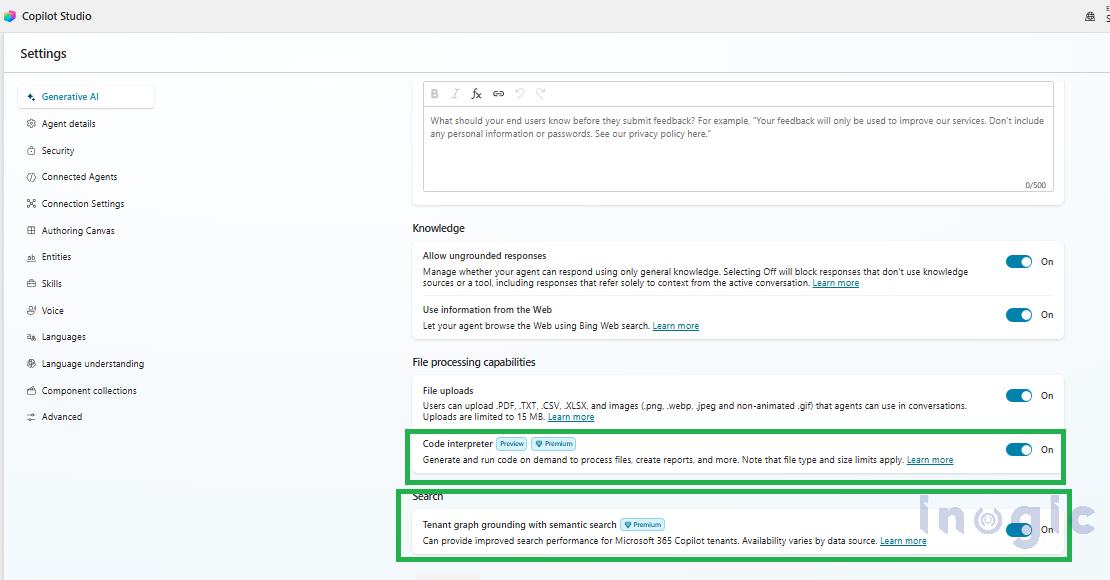
You can enable code interpret in the agent setting in Generative AI, scrolling down you will find the option for code interpreter and enable that.
There are two ways to feed structured data into a Copilot Studio agent for analysis. The first is user-uploaded files where someone attaches a CSV or Excel file directly in the chat. The second, and more enterprise-relevant approach, is connecting a SharePoint Document Library as a knowledge source. In this blog, we focus on the SharePoint approach... Read More


