web
You’re offline. This is a read only version of the page.
close
Skip to main content

Notifications

Announcements

Community site session details

Community site session details

Session Id :
Power Platform Community / Forums / Power Pages / Status:400 Your organi...
Power Pages
Suggested Answer

Status:400 Your organization's policies don't allow you to share with these users, for Grant item

(1) ShareShare
ReportReport
Posted on by 986
Hi everyone,
I had designed an automated flow (with Trigger action: When an Item is created {SharePoint list} (the list name is User List). In this list we are feeding the data through API call (that is done through SharePoint API endpoint wherein they pass some basic details like: EmployeeID, Experience,Designation, ReportingManagerEmail, IsActive (Yes/No) etc) once an item is created my flow gets triggered that is used to assign custom item permissions i.e. only the user and his immediate Manager and Manager's RM {if there is any} get access (basically 2 level hierarchy). The flow looks like:

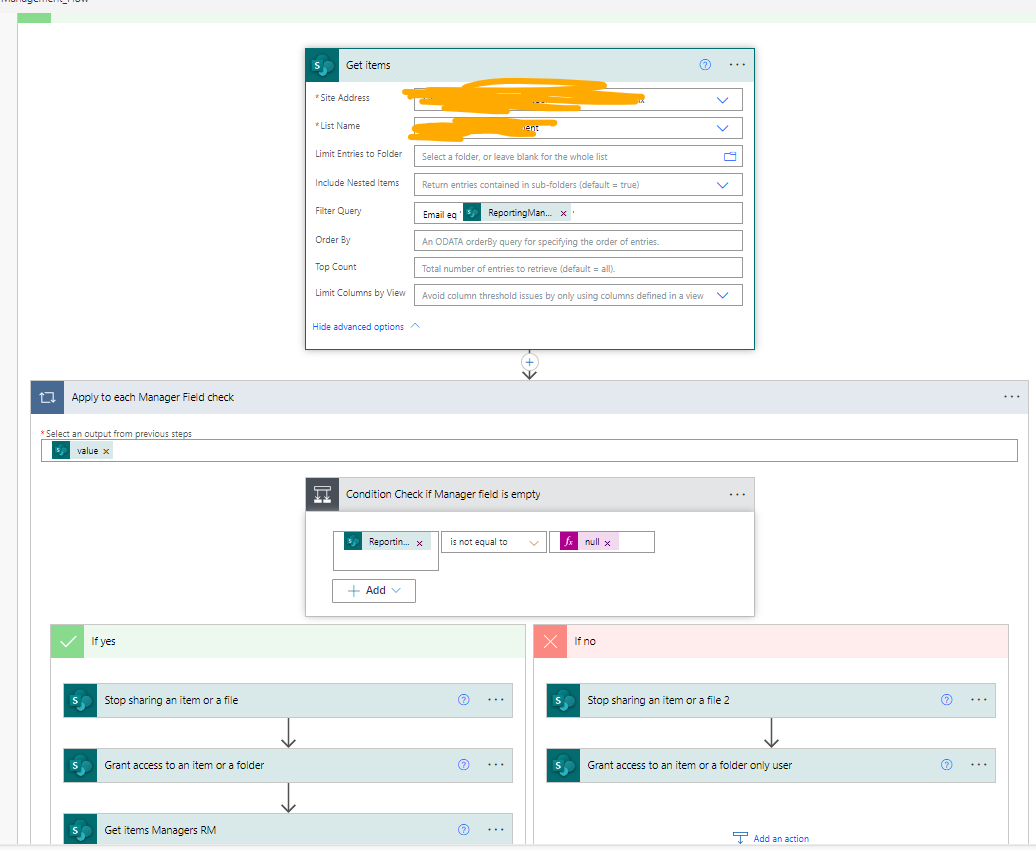

In the Get Items action (In Yes block: of condition) it is used to retrieve managers details (of that particular user) and similarly to get managers RM I have another action 'Get Items Managers RM', if the user has no Manager assigned that field is empty then I am just granting only the user the access (which is in the No block of Condition-2: Check If Manager field is empty)
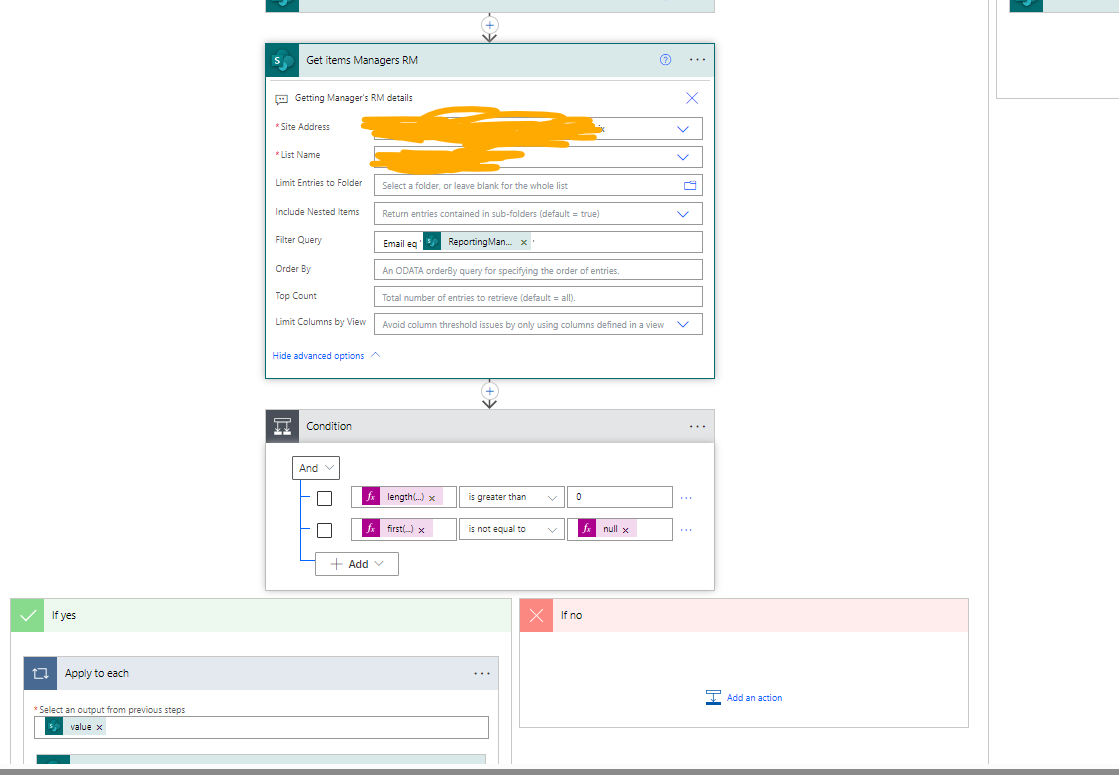

In the Get items Managers RM: (Used to get details of Managers RM details)
Filter Query: Fetching the Managers RM details only (that particular user managers RM)

Example:
User
Samuel Badree (is the user whose record gets created in the list) {Manager: sam@xyz.com}
Sam Lee {Manager: joe@xyz.com}

The flow gets triggered in when an item is created trigger action we get that user details like email, designation, ReportingManagerEmail, etc.
Now in 1st Grant action:
We assign access to User and his manager access (i.e. Samuel and Sam}

Now we retrieve details of Sam Lee's manager i.e. Joe (from the User List} in the 'Get items Managers RM' action
Then we are checking if the response/output from previous action is it empty or not, like for instance if Sam did not have any manager (it can be he is CEO) then in that case the previous
action wouldreturn empty and we go in no block : do nothing, but in this example as Sam does have a manager 'Joe'  it (the condition will return true) and go in Yes block and give
Joe the access to Samuel's record (as he is part of Sam's team who reports to him)


In the condition I am just checking Manager's RM is not empty to avoid empty values and then flow getting failed to avoid that I have added the two condition check
Conditions:
length(outputs('Get_items_Managers_RM')?['body/value']) is greater than 0
first(body('Get_items_Managers_RM')?['value'])?['ReportingManagerEmail'] is not equal to null

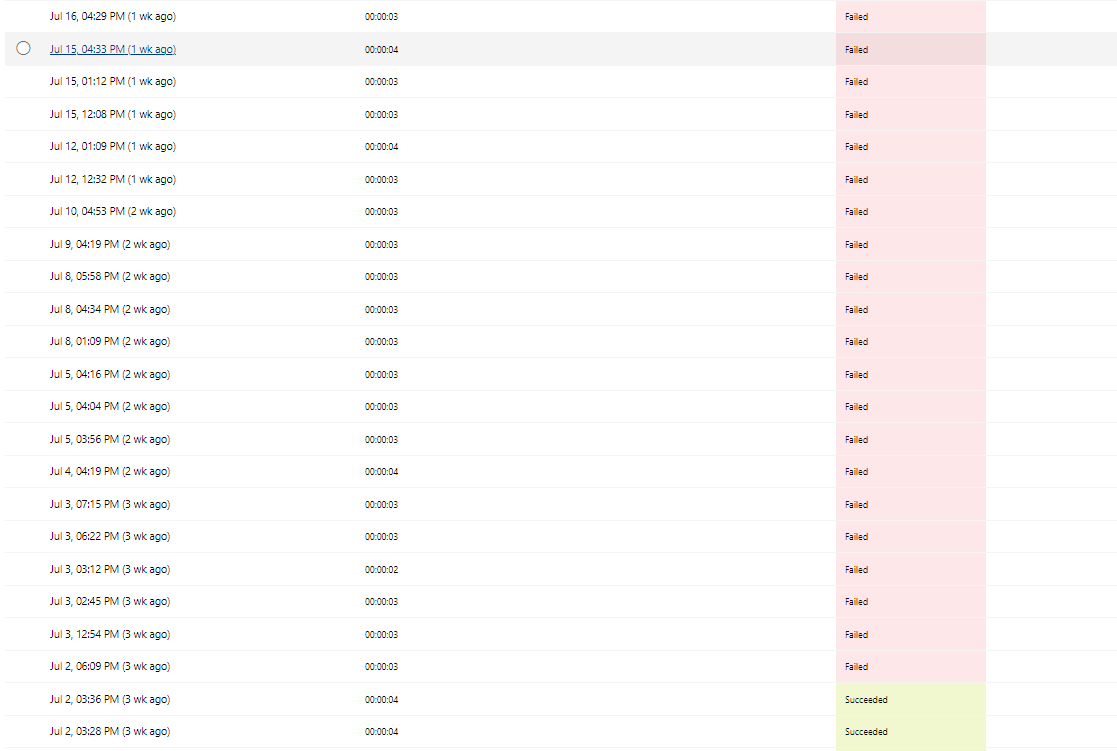
So, this flow was working fine, but last week I got an automated notification email regarding this flow that there were flow runs that were failed
(which we usually get when the flow fails multiple times), so when I had a look, the flow had failed almost 20-25 times and when I checked for
the reason it was at Grant item access or file action


And when I checked the Output for the Bad request in Grant access action:


So I am not sure what was the issue, so today I created a manual flow just to check for the flow runs that were failed check if the users are present in Office365 list, so right now I have added an action Search Users from Office 365 wherein its search term I am giving it the user email as input and then in my existing condition I have added another condition group (AND group) wherein I am checking if its length is not 0 (if yes then continue with my existing flow in Yes block else do nothing)
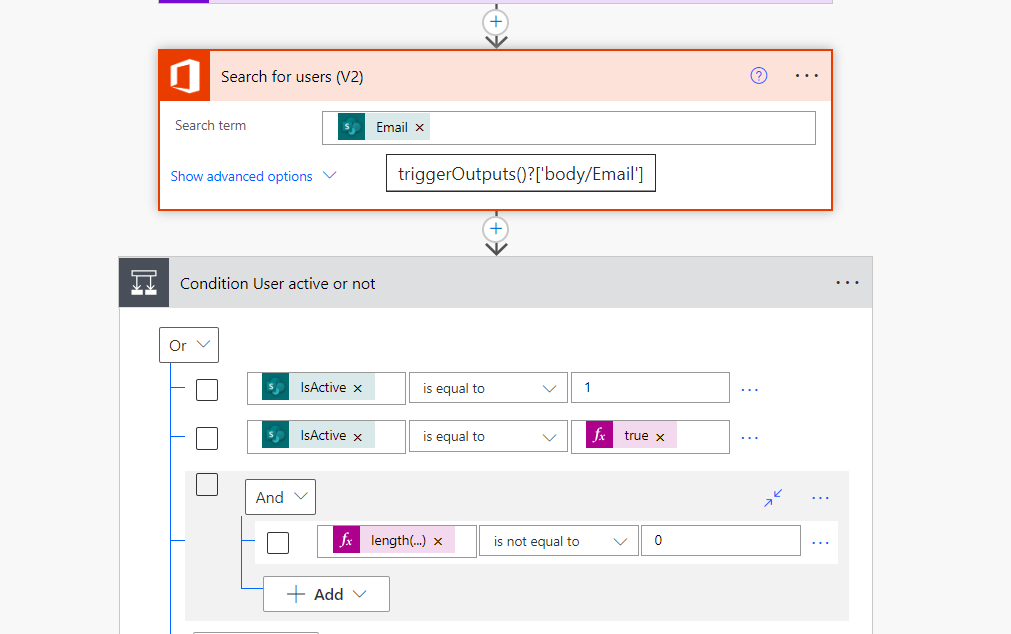
 

The condition in And group is:
length(outputs('Search_for_users_(V2)')?['body/value']) is not equal to 0

Also just to cross check I created a manual flow to see (for all the flow failed runs) whether that user was present in Office365
or not:
And I found out all of them are present in Office365 User DB (maybe it might that they have been added later as these failed
attempts happened few weeks back and now its been a while)

But now I have few questions:
1. What is causing this issue?
2. How to resolve this issue to avoid any more failed flow runs?
3. The condition that I have added now (to see if the item created for a user are they part of Office 365 user DB that is
they have an Office 365 associated/created for them) will this be able to solve this problem?


Need some ideas/solution on how to resolve this problem, if you guys can provide any valuable input it be quite helpful.
If you need any more information do let me know I will share that as well.

Regards,
Sidhant.
 
Categories:
I have the same question (0)
  • Sidhant_02 Profile Picture
    986 on at
    Hi everyone,
    Just a quick update so I tested the functionality of checking whether the given user is already registered in Office 365 as mentioned in my original post:
    Just one slight update that I made to the flow which was used the 'empty()' method in place of length, the reason being few flow runs were getting fa-
    iled (even with the length function) so I used empty:
    New Expression:
    empty(outputs('Search_for_users_(V2)')?['body/value'])

    So it worked for few failed runs but somehow there is one instance where it is still failing for one user (Assume Dem1) 
    Previously for Dem1 the Search User (V2) action was returning a blank array like:
    body:[]

    And then after some time that user (Dem1) was registered so on triggering the flow it got failed again and one new 
    was created item (assume Raj for which the Get user V2 action returned blank)


    But using empty it still evaluated to 'true' I expected it to go in false block as the action output from Get user V2 was
    empty.

    So can you please suggest the proper way in checking the empty body of an action.
    Which one of these is correct?
    Current expression:
    empty(outputs('Search_for_users_(V2)')?['body/value']) is not equal to true (fx:true)

    Older expression:

    length(outputs('Search_for_users_(V2)')?['body/value']) is not equal to 0

    Regards,
    Sidhant.

     
  • Sidhant_02 Profile Picture
    986 on at
    Hi,
    Understood the issue why it is failing and why it is evaluating to true even if and condition is not getting evaluated to true:
    i) First reason being for couple of users who exists in Office 365 DB but still it is failing it was because their AccountEnabled is set to false which I observed while looking in the outputs of Get Users V2 action:


    ii) Secondly current expression structure:
    (I just added one more condition check to see:
    1- Check the IsActive is set or not
    2- In the AND group added 2 conditions:
        i) Check if the given user is registered in Office 365 or not (using length function)
        ii) If the user is present in Office 365 then is their AccountEnabled != false (that means their account is enabled)


    Currently what I think is happening is it is following the OR structure that means if any condition is evaluated to True it directly goes in True block
    Instead I wanted the following structure to be followed:
    (IsActive1_Condition OR IsActiveCondition2) AND (AndCondition1 and AndCondition2)

    I am almost there to my final solution just need some help to get the sort the required condition structure that I have mentioned above
  • Suggested answer
    Sidhant_02 Profile Picture
    986 on at
    Hi,
    Quick update now all the issues are fixed. What I have done is for the IsActive column I have just kept one condition i.e. IsActive is equal to True
    And have kept the 2 new conditions (regarding the Active Users (V2)) which were added as a group and replaced the Outer operator from OR to AND:

    Previously I had kept two conditions for IsActive column because in some articles it referred Yes-1 and No-0 and some referred to use True/False, but when I checked the o/p of the trigger action (When an item is created} there I saw it return value as True/False so now I removed the extra check and used 'AND' making all the conditions to be mandatory to avoid the Status:400 issue.

    Regards,
    Sidhant.

Under review

Thank you for your reply! To ensure a great experience for everyone, your content is awaiting approval by our Community Managers. Please check back later.

Helpful resources

Quick Links

Forum hierarchy changes are complete!

In our never-ending quest to improve we are simplifying the forum hierarchy…

Ajay Kumar Gannamaneni – Community Spotlight

We are honored to recognize Ajay Kumar Gannamaneni as our Community Spotlight for December…

Leaderboard > Power Pages

#1
Fubar Profile Picture

Fubar 78 Super User 2025 Season 2

#2
Jerry-IN Profile Picture

Jerry-IN 75

#3
sannavajjala87 Profile Picture

sannavajjala87 31

Last 30 days Overall leaderboard



