web
You’re offline. This is a read only version of the page.
close
Skip to main content

Notifications

Announcements

Community site session details

Community site session details

Session Id :
Power Platform Community / Forums / Power Automate / maxquerystringlength i...
Power Automate
Unanswered

maxquerystringlength in custom connector

(0) ShareShare
ReportReport
Posted on by 2

Good morning,


I'm currently tring to create a custom connector for Hubspot CRM, but i'm getting a C# error
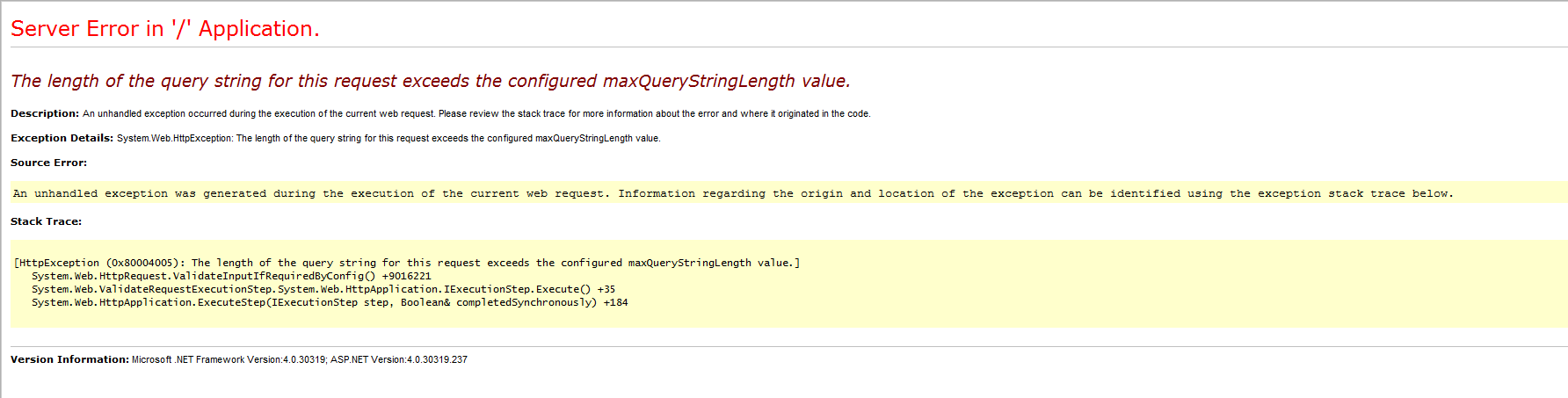
enter image description here


because of a too long query string.


This is not easy to understand the error, but here are the step.


I configure a custom Connector with an Oauth 2.0 connection


Scheme : https
Host : app.hubspot.com
Base url : /

Client ID and Client Secret :  from the app created with the hubspot interface.

Authorization url : https://app.hubspot.com/oauth/authorize

Token anf refresh URL : https://app.hubspot.com/oauth/v1/token

Scope : contacts


this gave me a redirection URL as expected.

When I try a new connection (with test), i have a popup wich ask me for hubspot connexion, and i can log in correctly, but then i get the error about the query.

This seems not to be an hubspot issue, as the error is in C# from an Azure URL, and as when a provide a wrong Scope or a Scope for which i don't have access Hubspot provide an error from there website.

Does anyone have an idea to solve this error ?


Thanks,

Francois


Categories:
I have the same question (0)
  • tfhegdbn Profile Picture
    149 on at

    Cat Happy

    I don't know if these links can help you, I am a newbie to the Web api.


    https://www.aspforums.net/Threads/899424/Solved-The-length-of-the-query-string-for-this-request-exceeds-the-configured-maxQueryStringLength-value/


    https://stackoverflow.com/questions/11636386/how-to-configure-the-web-config-to-allow-requests-of-any-length


    I feel that this is not a problem on the Flow side. Maybe you should go to the C# community to make a turn.Smiley Very Happy


    Regards,

    Dandy


  • fdyvoire Profile Picture
    2 on at

    Thanks for your answer,


    I know this is a C# problem, but i don't have access to the source code of Microsoft Flow.


    I will report this problem as a bug since no one has an idea,


    Regards,
    François

  • FlowMax Profile Picture
    4 on at

    The resulting JWT token appears in the URL and exceeds the query limit.  We cant change the grant type so we are sort of hosed.

  • FlowMax Profile Picture
    4 on at

    This is on the flow side I think - Flows seem to use the authorization_flow grant type once the user is authenticated and grants consent the resulting token is returned in the URL when the redirect is called.  This causes the query string to be too long.

Under review

Thank you for your reply! To ensure a great experience for everyone, your content is awaiting approval by our Community Managers. Please check back later.

Helpful resources

Quick Links

Forum hierarchy changes are complete!

In our never-ending quest to improve we are simplifying the forum hierarchy…

Ajay Kumar Gannamaneni – Community Spotlight

We are honored to recognize Ajay Kumar Gannamaneni as our Community Spotlight for December…

Leaderboard > Power Automate

#1
Michael E. Gernaey Profile Picture

Michael E. Gernaey 522 Super User 2025 Season 2

#2
Tomac Profile Picture

Tomac 364 Moderator

#3
abm abm Profile Picture

abm abm 243 Most Valuable Professional

Last 30 days Overall leaderboard



