web
You’re offline. This is a read only version of the page.
close
Skip to main content

Notifications

Announcements

Community site session details

Community site session details

Session Id :
Power Platform Community / Forums / Power Automate / Action failed. No depe...
Power Automate
Unanswered

Action failed. No dependent actions succeeded.

(2) ShareShare
ReportReport
Posted on by 156

Hello,

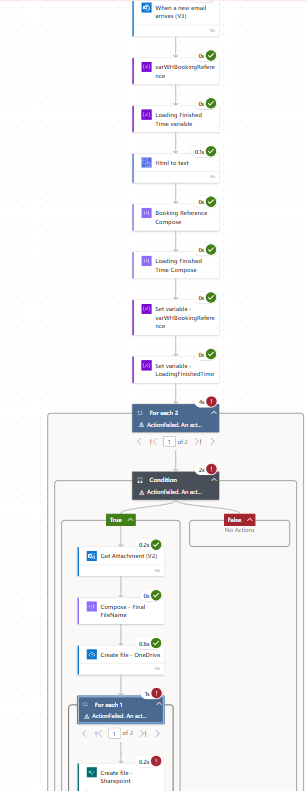
i have a power automate flow that takes the attachment (CSV) from an email and saves it to a sharepoint folder. The flow was working okay, until recently, the flow keeps failing. I get an error "Action failed. No dependent actions succeeded" for the For Each, Condition and on another for each. While my create file to Sharepoint gets a "Bad Request".


My flow is as follows My trigger is when a new email arrives (V3), initialize variable Name: varWHBooking Reference, Type:String, Value: empty, Initialize variable - Name: LoadingFinishedTime, Type: String, Value: empty, Html to Text, Compose1 (substring(triggerOutputs()?['body/subject'], 35, 27)), Compose2: (concat( substring(body('HTML_to_Text'), add(indexOf(body('HTML_to_Text'), 'Loading Finished Time:'), 155), 13), substring(body('HTML_to_Text'), add(indexOf(body('HTML_to_Text'), 'Loading Finished Time:'), 169), 2) )), set variable Name:varWHBooking Reference, set variable - Name: LoadingFinishedTime, For Each - attachment from the trigger, Condition - attachment name contains csv, get attachment - message ID: message Id of the trigger, Attachment ID: attachment id of the attachment, Compose3 - concat(variables('varWHBookingReference'), ' ', variables('LoadingFinishedTime')), For Each - attachment from the trigger. Create file (Sharepoint) - File Name: Output of the compose3, File Content: Content Bytes (Get attachment)


What could be causing this error, because it has worked before and i dont know where to look anymore.
 

Categories:
I have the same question (0)
  • Expiscornovus Profile Picture
    33,195 Most Valuable Professional on at
    I see the outputs of the Compose 3 is used for the file name. That expression is:
    concat(variables('varWHBookingReference'), ' ', variables('LoadingFinishedTime'))
    Does your LoadingFinishedTime contain the extension of the file? In other words would it end with .csv?
     
    If not, try the below expression instead:
    concat(variables('varWHBookingReference'), ' ', variables('LoadingFinishedTime'), '.csv')
     
     
  • JL82 Profile Picture
    156 on at
    Thank you for your reply. I put the .csv on the create files for OneDrive and Sharepoint. I was able to find that the error was invalid file name for the create file in Sharepoint, but the Create file in OneDrive succeeded which is weird because i have the same file name and file content for both actions in OneDrive and Sharepoint . Apparently on the Create file sharepoint, there is a \n in between the two variables. I understand i can use "replace" to remove that but what i dont understand is why would there be a \n there but not in the OneDrive file?
     

Under review

Thank you for your reply! To ensure a great experience for everyone, your content is awaiting approval by our Community Managers. Please check back later.

Helpful resources

Quick Links

Forum hierarchy changes are complete!

In our never-ending quest to improve we are simplifying the forum hierarchy…

Ajay Kumar Gannamaneni – Community Spotlight

We are honored to recognize Ajay Kumar Gannamaneni as our Community Spotlight for December…

Leaderboard > Power Automate

#1
Michael E. Gernaey Profile Picture

Michael E. Gernaey 525 Super User 2025 Season 2

#2
Tomac Profile Picture

Tomac 324 Moderator

#3
abm abm Profile Picture

abm abm 232 Most Valuable Professional

Last 30 days Overall leaderboard



