web
You’re offline. This is a read only version of the page.
close
Skip to main content
Community site session details

Community site session details

Session Id :
Power Pages - Administer & Monitor
Unanswered

Power Platform Environment Not Showing When Import Customizations is Set to None

(0) ShareShare
ReportReport
Posted on by
 
Hello, 
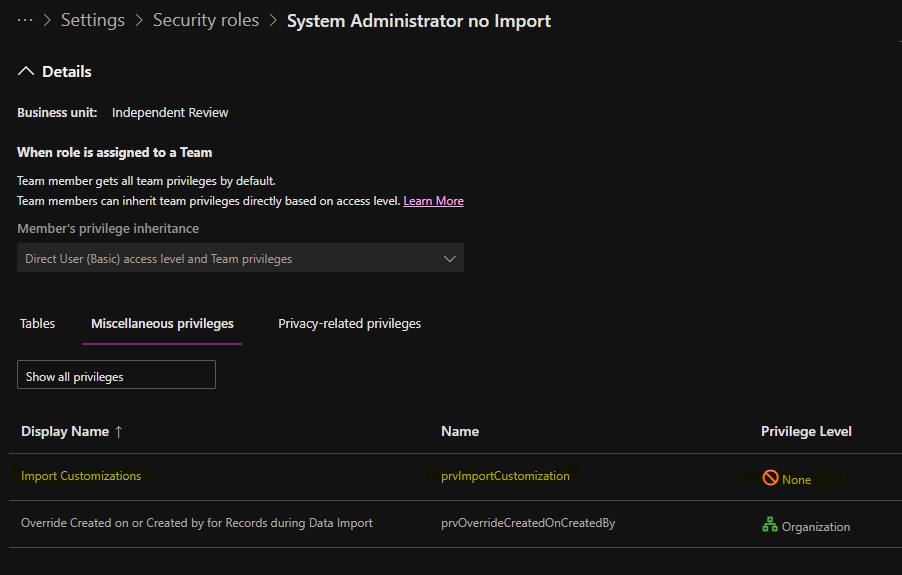
We are using Azure DevOps pipelines for our ALM process in Power Platform.  We want to limit deployment of solutions to use pipelines only and not be able to Import solutions into the target environments.  To do this we copied the System Administrator role and renamed it to System Administrator no Import > set the privilege Import Customizations - prvImportCustomization to None in Power Platform Admin center > Settings > Security Roles > System Administrator no Import > Miscellaneous privileges

We moved the users in the System Administrator security role to System Administrator no Import and now they can't see the target environments in Power Platform Admin center

Why aren't the users able to see the target environments in Power Platform Admin center when the only permission I took away is the Import Customizations?










Categories:
I have the same question (1)

Under review

Thank you for your reply! To ensure a great experience for everyone, your content is awaiting approval by our Community Managers. Please check back later.

Helpful resources

Quick Links

Responsible AI policies

As AI tools become more common, we’re introducing a Responsible AI Use…

Chiara Carbone – Community Spotlight

We are honored to recognize Chiara Carbone as our Community Spotlight for November…

Leaderboard > Power Pages

#1
Fubar Profile Picture

Fubar 46 Super User 2025 Season 2

#2
Michael E. Gernaey Profile Picture

Michael E. Gernaey 43 Super User 2025 Season 2

#3
Jerry-IN Profile Picture

Jerry-IN 40

Last 30 days Overall leaderboard

Featured topics


