web
You’re offline. This is a read only version of the page.
close
Skip to main content
Community site session details

Community site session details

Session Id :
Power Apps - Connector Development
Suggested Answer

Is there a throttle limit when using a DELETE request in GRAPH API?

(2) ShareShare
ReportReport
Posted on by 8
Hi guys
 
I created a custom connector that I am using in a collection and different flows in power automate. The main target is to have a one-way sync between a file and contacts for different users in Outlook.
 
The custom connector, connection and authorization is working as it supposed to be, since I can do actions.
 
The only issue I'm currently facing is that certain DELETE request when using Graph API are giving me 403's and once every while a success (203? or blank page) 
 
The requests that are giving me these problems are:
 
So in short: I want to delete certain folders and childfolders in Outlook. In certain instances, it is working, but most of the time I get 403 errors while the flow is unchanged or when testing in the custom connector.
 
Is there a throttle limit when using a DELETE request in GRAPH API with contactFolders & childFolders
Did somebody experienced this issue also and what is the throttle limit (2 per 5 hours, 10 per day, ...) for these requests?
 
Thank you for your time.
I have the same question (0)
  • Suggested answer
    SebS Profile Picture
    4,569 Moderator on at
    Is there a throttle limit when using a DELETE request in GRAPH API?
    A 403 is basically “you’re not allowed to do that”.
    The call is fine, but the folder you’re trying to delete is blocked — and in your case I think the issue is that some of those folders are under a retention policy or temporarily locked because something is using them, not throttling.
    A 429 is “slow down, too many requests at once”.
    That one only shows up when you’re actually hitting Graph limits.
    So in short:
    403 = permissions/restriction on the folder
    429 = too many requests, try again later
  • Power Platform 1919 Profile Picture
    1,773 on at
    Is there a throttle limit when using a DELETE request in GRAPH API?
    Adding to @SebS response,
     
    I am not sure about throttling limits, but I know it is not very less like 2 per day or 10 per week.
     
     
    I think the error is because of trying to access other users outlook and doing stuff on behalf of them.(Note this will work with your own outlook folders and sub folders, but won't work on other users outlook items)
     
    Which I think can result in 403 (Forbidden) unless you have a service principal or your own account with delegation permissions to access other user accounts outlook.
  • wolenberg_ Profile Picture
    1,013 Moderator on at
    Is there a throttle limit when using a DELETE request in GRAPH API?
    Hi @JS-26111451-0 , 

    You’re not hitting a special “DELETE limit” in Graph throttling applies to all request types the same way. The 403s you’re seeing usually mean either the app doesn’t have the right permissions (Contacts.ReadWrite) or you’re trying to delete a folder that Outlook won’t allow (like default system folders). If you’re deleting a lot at once, Graph may throttle, but you’ll see a 429 Too Many Requests error in that case, not 403.

     In short: check permissions and make sure the folders are actually deletable. Add retry logic if you’re doing bulk deletes.


    If this helped or could help others in the community, feel free to give it a like or a kudo — it helps surface useful answers for everyone!

  • JS-26111451-0 Profile Picture
    8 on at
    Is there a throttle limit when using a DELETE request in GRAPH API?
    Thank you for the replies and help guys.
    Sorry if I explained it in the wrong way.
     
    To make it very clear and add more context for you to understand my problem:
    I'm using an entra app with the right context and sufficient rights see screenshot below:
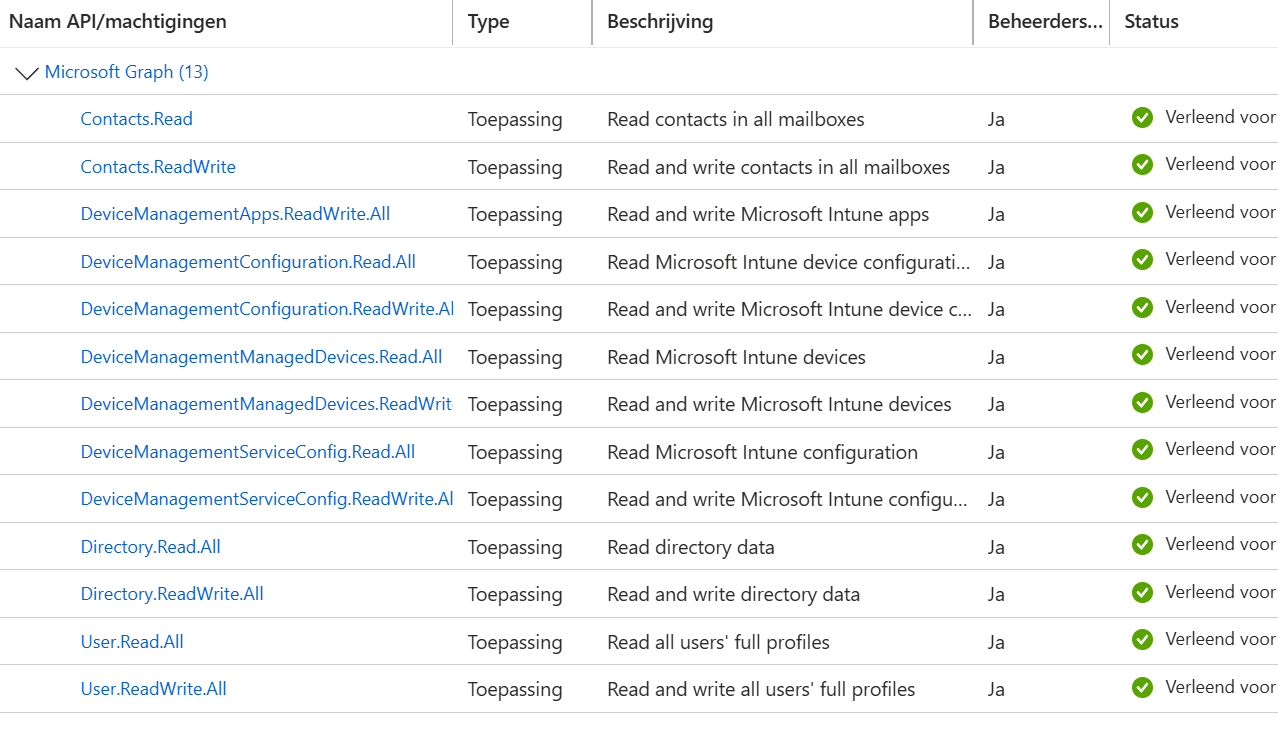
     
    In Power Automate I'm using a connection that is a service principal connection.


    Below is an example of my flow failing:
    See that during the first child folder deletion is a succes but the second one gives problems:
     
    So, it did work 1 time in the flow, but the second time. It gave an error and didn't delete the child folder.
    This is the same for a "root" contactFolder that is originally created by a flow with my custom GraphAPI connector.
     
    Can somebody point me out to where I can check/change some settings so it would not use the retention time?
    Since I'm sure its not an rights/delegation issue.
     
    Thank you for your time and help.
  • JS-26111451-0 Profile Picture
    8 on at
    Is there a throttle limit when using a DELETE request in GRAPH API?
    Hi guys
     
    Just wanted to let you know that I found a solution.
     
    If the folder already exists that you are trying to delete in the "recycle bin", then I assume this is when you get this error.
     
    I fixed the issue by using these endpoints:
    /users/{user-id}/contactFolders/{contactFolder-id}/childFolders/{contactFolder-id1}/microsoft.graph.permanentDelete
    /users/{user-id}/contactFolders/{contactFolder-id}/contacts/{contact-id}/microsoft.graph.permanentDelete

Under review

Thank you for your reply! To ensure a great experience for everyone, your content is awaiting approval by our Community Managers. Please check back later.

Helpful resources

Quick Links

Coming soon: forum hierarchy changes

In our never-ending quest to improve we are simplifying the forum hierarchy…

Ajay Kumar Gannamaneni – Community Spotlight

We are honored to recognize Ajay Kumar Gannamaneni as our Community Spotlight for December…

Leaderboard > Power Apps

#1
WarrenBelz Profile Picture

WarrenBelz 803 Most Valuable Professional

#2
Michael E. Gernaey Profile Picture

Michael E. Gernaey 314 Super User 2025 Season 2

#3
MS.Ragavendar Profile Picture

MS.Ragavendar 253 Super User 2025 Season 2

Last 30 days Overall leaderboard

Featured topics


