web
You’re offline. This is a read only version of the page.
close
Skip to main content

Announcements

News and Announcements icon
Community site session details

Community site session details

Session Id :
Power Platform Community / Forums / Power Pages / Unable to make Powerpa...
Power Pages
Answered

Unable to make Powerpages website as public

(0) ShareShare
ReportReport
Posted on by 65
Hello Everyone
 
I just did a very basic banking website using power pages (With help of copilot).
 
Its a very simple and basic power pages website where I have some navigation menu items like accounts, loans, Contact us, FAQ etc. I then used copilot to just design sample html pages for account types, loan types, a contact us form etc. I then linked these pages to the navigation items.
 
Now all i want to do, is make this "public" (its currently defaulted to private). But when I change private to public, it gives me this message

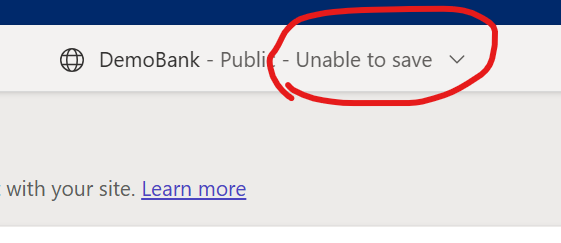


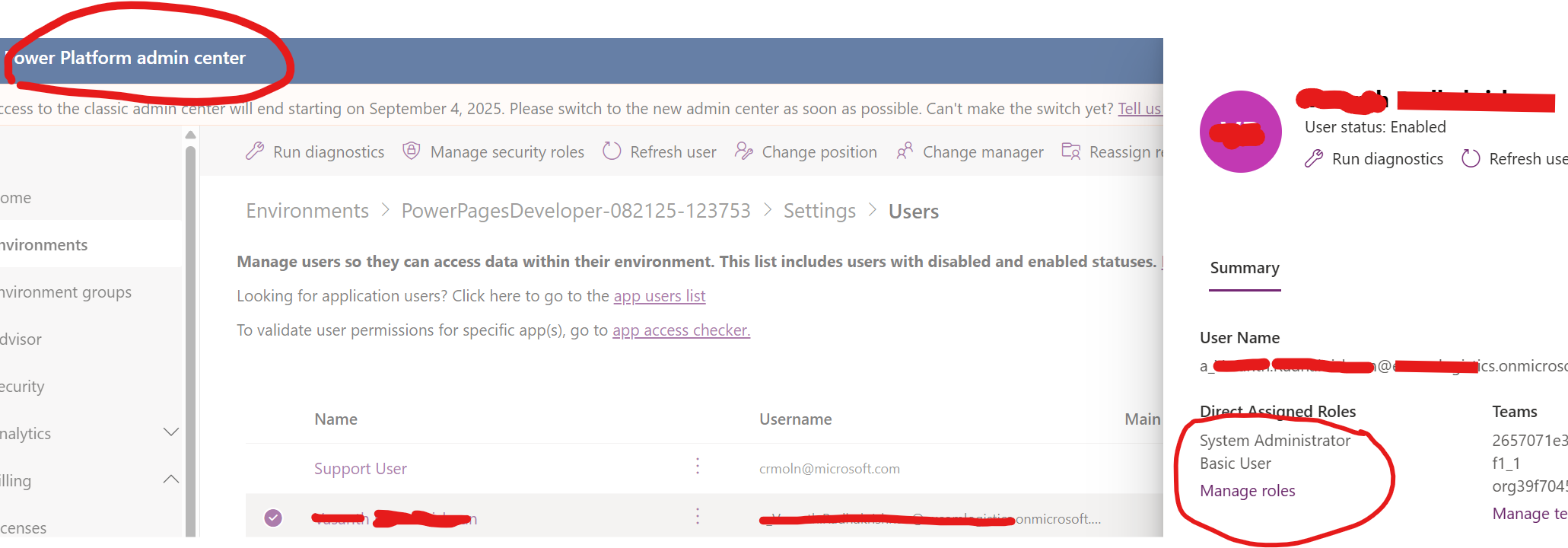
It says "unable to save" and stays in private mode. I did check if the user that I've logged into this environment as, is a system administrator, and I am a system admin in power platform admin centre. Please see screenshot below
 
END GOAL : 
---------------------
The end goal is to make this public, so that I can create a copilot studio chatbot against this public facing demo website ive created. I want to use this website as a "knwoledge source" so that I can demo to a customer, the capablities of the copilot studio chatbot, against this public website. 
 
Categories:
I have the same question (0)
  • Verified answer
    mattavdven Profile Picture
    125 on at
     

    Thanks for sharing the details of your setup. You’re correct — the issue is that your site is currently built in a Power Pages Developer Environment, which does not support publishing public-facing sites. Developer environments are meant for testing and prototyping, so the “make site public” option won’t work there.

        
    To make your site public, you’ll need to:
    • Export the site as a solution from your Developer Environment.
    • Import the solution into a Production-type environment.
    • Ensure that the appropriate Power Pages licenses are allocated in that Production environment.
    • Once in Production, you’ll be able to set the site to public and then use it as a knowledge source for your Copilot Studio chatbot demo

    This should resolve the issue and let you move forward with your scenario.


  • SPUser1980 Profile Picture
    65 on at
    Hey  
     
    Thanks for your response. its super helpful. 
     
    Just one more final question please. I understand that i cant make this public in this scenario. However i was intending to demo this to a potential client, on capabilities of a copilot studio chatbot against a public website.  Also iam not sure if i have a production environment where i can import this as a solution (to make public)

    so what are the options I have? Is there any way i can demo this website (with a chatbot) without having to export into a prod environment 
  • Verified answer
    mattavdven Profile Picture
    125 on at
    You cannot directly add the Power Pages site as knowledge source to your chatbot. Because the website is not public accessible. You can add the underlying Dataverse tables to your CoPilot chatbot as knowledge sources. But the tables have to contain data to use in a demo
     
  • SPUser1980 Profile Picture
    65 on at
     
    thanks a ton that worked.  However there is one final hurdle thats preventing me from demo'ing this. Its with the answer its giving.
     
    -The website is now public and ive added it as a knowledge source for the bot

    -Ive also added the linked html pages as additional knowledge source for the bot as attached here


    -Also ive made sure i have turned on generative AI in the settings, and made these 3 knowledge sources (which are the main landing page, the sub html pages ) as official sources. 


    -But after publishing , when i search "give me the loan types" for example, it still returns the below message. Not sure what am i doing wrong?

    I'm sorry, I'm not sure how to help with that. Can you try rephrasing?

    -Here is the page that has the information of the loan types (which is already added as a knowledge source as you can see above)


Under review

Thank you for your reply! To ensure a great experience for everyone, your content is awaiting approval by our Community Managers. Please check back later.

Helpful resources

Quick Links

Introducing the 2026 Season 1 community Super Users

Congratulations to our 2026 Super Users!

Kudos to our 2025 Community Spotlight Honorees

Congratulations to our 2025 community superstars!

Congratulations to the April Top 10 Community Leaders!

These are the community rock stars!

Leaderboard > Power Pages

#1
Valantis Profile Picture

Valantis 58

#2
11manish Profile Picture

11manish 49

#3
Haque Profile Picture

Haque 28

Last 30 days Overall leaderboard



