web
You’re offline. This is a read only version of the page.
close
Skip to main content
Community site session details

Community site session details

Session Id :
Power Platform Community / Forums / Power Automate / Excel online (business...
Power Automate
Unanswered

Excel online (business) converts date to days. So how do i compare it with today's date?

(0) ShareShare
ReportReport
Posted on by 30

Hi experts,


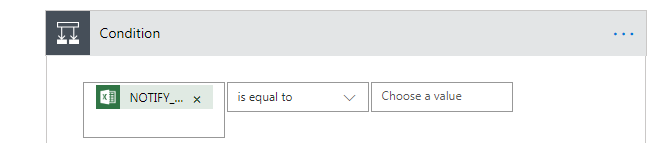
I'm trying to compare a date (from excel online (business)) with today's date. From the picture below, the left side is the date value of "43531" from Excel Online (Business) connector. So how do i compare it with today's date? I was thinking of using utcnow, but how do i convert it to days?


Appreciate your help in this. Thanks.


Kevin 

Categories:
I have the same question (0)
  • Dev_Nikhil Profile Picture
    225 on at
    Re: Excel online (business) converts date to days. So how do i compare it with today's date?

    Hi @kev1234 ,

    Yes you can use "utcnow()" with some Twists like below

    utcnow('dddd')

    You just have to put it into the Regular expression and you will get the Today's Day value.


    For another operations i would like to suggest you a Wonderfull blog post please refer it specially when you will be working on Date and Time Into Microsoft Flow.

    https://www.o365dude.com/2017/05/01/working-with-dates-times-in-microsoft-flow/

    Hope this will solve your Issue.


    Please accept this as solution if it solves your problem.


    Thanks & Regards,

    Dev_Nikhil


  • kev1234 Profile Picture
    30 on at
    Re: Excel online (business) converts date to days. So how do i compare it with today's date?

    Hi @Dev_Nikhil ,


    Thanks for your reply. 


    I think i wasn't clear in my question. I implemented a connector 'List rows present in a table' from Excel Online (Business) that pulls in the data collection. However the date value is being converted to total days since '1-1-1900' + 2 days. See below.


     = 43531 (which is the total days since '1-1-1900' + 2 days)


    So the question is, how do i compare 43531 days with today's date? I would like to send an email notification when the date in the excel column 'NOTIFY_6M' match with today's date.


    FYI, i encountered sign-in issues when using other connectors like 'Excel' and 'Excel Online (OneDrive)'. So the only option i have was 'Excel Online (Business)'.


    Anyone?

  • Verified answer
    kev1234 Profile Picture
    30 on at
    Re: Excel online (business) converts date to days. So how do i compare it with today's date?

    Found the answers to my questions. Thanks to @vecerpa from this post below:

    https://powerusers.microsoft.com/t5/Building-Flows/Excel-Online-Date/m-p/247673#M24544


    So below is my solution after applying your formula:


    Left side of the equation

    formatDateTime(addDays('1900-01-01',sub(int(item()?['NOTiFY_6M']),2)),'yyyy-MM-dd')


    Right side of the equation

    formatDateTime(utcNow(),'yyyy-MM-dd')


    So both side will return a date string with the format of 'yyyy-MM-dd', e.g. 2019-03-07.

  • vecerpa Profile Picture
    786 on at
    Re: Excel online (business) converts date to days. So how do i compare it with today's date?

    Hello @kev1234 ,

    You are welcome.

    And have a nice Flowing 🙂

    P.

  • Community Power Platform Member Profile Picture
    on at
    Re: Excel online (business) converts date to days. So how do i compare it with today's date?

    @kev1234 So instead of the Condition you have in the initial post, this is the one you used? Also is this right after the List Rows Present in Table step?

Under review

Thank you for your reply! To ensure a great experience for everyone, your content is awaiting approval by our Community Managers. Please check back later.

Helpful resources

Quick Links

Forum hierarchy changes are complete!

In our never-ending quest to improve we are simplifying the forum hierarchy…

Ajay Kumar Gannamaneni – Community Spotlight

We are honored to recognize Ajay Kumar Gannamaneni as our Community Spotlight for December…

Leaderboard > Power Automate

#1
Michael E. Gernaey Profile Picture

Michael E. Gernaey 462 Super User 2025 Season 2

#2
Tomac Profile Picture

Tomac 456 Moderator

#3
abm abm Profile Picture

abm abm 243 Most Valuable Professional

Last 30 days Overall leaderboard


