web
You’re offline. This is a read only version of the page.
close
Skip to main content

Announcements

News and Announcements icon
Community site session details

Community site session details

Session Id :
Power Platform Community / Forums / Power Pages / 📃One Multi-step Form ...
Power Pages
Answered

📃One Multi-step Form + One table & Multiple rows/entries

(0) ShareShare
ReportReport
Posted on by 28

Hi All!

I am working on a Power Page for signing up new customers and need some assistance on the best way to have multiple records created in the same table from the same multistep form.


Issue:

When I fill this out as it is, only the second reference is saved, its as if it is just overwriting the information from the first Reference.


Explanation:

I am using two tables, one for creating the Carrier, and then one for the references. I have the relationship between the two tables working correctly via the multistep form, but I would like to force the user to add multiple References.
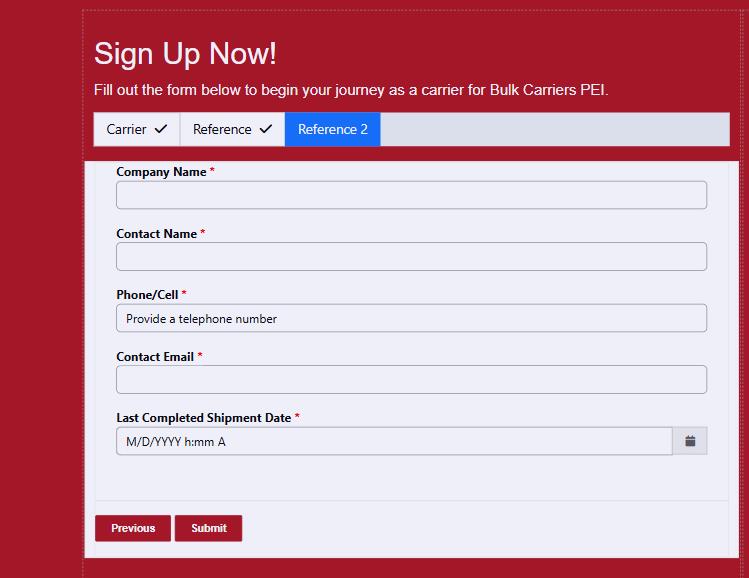
 

Any help would be much appreciated, I have been developing Power Apps since its first inception but have only just started out with Power Pages. I could not find anything online about this, so maybe I am just doing it wrong and should just add reference 1 and reference 2 as columns in the same table.


Thanks! 

Josiah

Categories:
I have the same question (0)
  • Verified answer
    Fubar Profile Picture
    8,487 Super User 2026 Season 1 on at
    Not sure how the referees are related to the carrier - but when you need multiple records of the same type I would generally use a subgrid (and if you need to limit the number in the subgrid - or make sure at least 1 exists - add custom validation to count the rows in the grid).
     
    I am assuming a structure like Carrier  1 to many Reference 
     
    E.g. first step captures general carrier details, second step would be a different dataverse form/tab for carrier that only has the references subgrid on it. In power pages you then configure the Step that has the subgrid on it to Create/Edit/Delete etc by configuring a Metadata record on the Step (Metadata is available from the Steps 'related' records in the Power Pages Management app).
     
     
  • problex Profile Picture
    28 on at
    Thank you @Fubar I ended up using a Subgrid as mentioned, I found the process pretty time consuming but ended up getting it working by doing the following.
    1. Create a form and view for your new table that has a relationship with the master table.

    2. create a new form in the Master table with the subgrid. (It seems that Subgrids only show up on Update forms not Insert)

    3. add form to the multistep form

    4. create a new basic form in Power Pages, select the new table and the form you created in step 1

    5. delete the new form from your page.

    6. go into the multistep form in power pages management

    7. open the new step that was created when we added the subgrid form to the multistep form

    8. create all links and relationships in the Associated Table Reference tab and Record Source in the Form Definition Tab

    9. go to the metadata tab and add the subgrid

    10. at the bottom of the page, add Create, Edit and Delete

    11. Set the form for the Create and Edit steps

    12. Save and close the step

    13. Save and close the Multistep form

    14. Go to Power Pages and create all Permissions, include Child permission for the table relationships.

    15. Sync the page and test it.


    I used the validation check provided by @inogic here https://community.powerplatform.com/forums/thread/details/?threadid=9bd04efe-81e5-4dca-a47d-8937df5c8e41

Under review

Thank you for your reply! To ensure a great experience for everyone, your content is awaiting approval by our Community Managers. Please check back later.

Helpful resources

Quick Links

Introducing the 2026 Season 1 community Super Users

Congratulations to our 2026 Super Users!

Kudos to our 2025 Community Spotlight Honorees

Congratulations to our 2025 community superstars!

Congratulations to the April Top 10 Community Leaders!

These are the community rock stars!

Leaderboard > Power Pages

#1
11manish Profile Picture

11manish 56

#2
Valantis Profile Picture

Valantis 46

#3
rezarizvii Profile Picture

rezarizvii 35

Last 30 days Overall leaderboard
