web
You’re offline. This is a read only version of the page.
close
Skip to main content

Notifications

Announcements

Community site session details

Community site session details

Session Id :
Power Automate
Suggested Answer

Invalid Time Zone ID

(1) ShareShare
ReportReport
Posted on by 19
Hi dear friends.
 
I have an issue when running my flow to convert the Time Zone. 
 
 
It works fine sometimes, but also failed at the same time. So I am wondering what's going wrong here.
 
The error message is always
Unable to process template language expressions in action 'Compose_-_End_Date' inputs at line '0' and column '0': 'In the template language function 'convertTimeZone', the value provided for the time zone id 'Asia/Kuala_Lumpur' was not valid. '.
 
I have changed according to its suggestion for many times, but it still failed saying that the time zone id I changed is incorrect, although suggested by Microsoft.
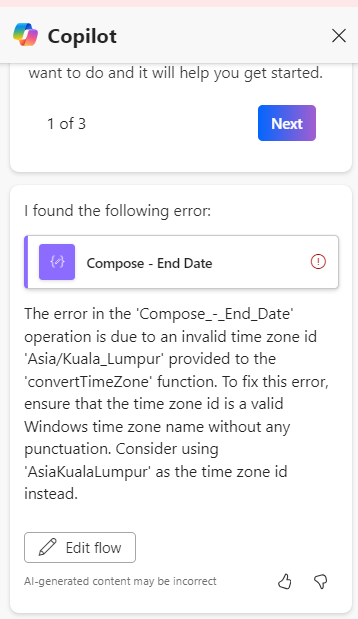
 
 It sounds much more ridiculous with the suggestion this round.
 
This is my expression. I am located in Kuala Lumpur Malaysia, GMT+8. This action is for me to block the calendar whenever an employee apply for time off. But due to timezone issue, if let say the employee will away from 27 -29 Sep 2024, the calendar will only block till 28 Sep, missing out 1 day. So I am using this expression to prolong the time to 29 Sep 2024.
 
formatDateTime(convertTimeZone(addHours(outputs('Get_response_details')?['body/rae1b263dd3cd4d59b8a18abc4abafafe'], 15), 'UTC', 'Singapore Standard Time'), 'yyyy-MM-ddTHH:mm:ss')
 
Appreciate it is someone could solve my issue!
Categories:
I have the same question (0)
  • Suggested answer
    JR-01080538-0 Profile Picture
    4 on at
    Hope the poster managed to work around the issue. 
     
    For those who bumped into this issue, you can try using 'Singapore Standard Time' for GMT+8.
     
    If you are from a different region, you can refer to this list below and refer to the Time Zone Name column:
     
  • Suggested answer
    Power Platform 1919 Profile Picture
    1,896 on at
    Hi ,
    Please try these formulas:
    1. You don’t actually need to addHours(…,15) if all you’re doing is converting from UTC to Singapore (UTC + 8). And you can collapse your formatting into the convertTimeZone call itself. Try either of these:
    convertTimeZone(
      outputs('Get_response_details')?['body/rae1b263dd3cd4d59b8a18abc4abafafe'],
      'UTC',
      'Singapore Standard Time',
      'yyyy-MM-ddTHH:mm:ss'
    )
    
    2. If you really need to shift by 15 hours after converting:
    formatDateTime(
      addHours(
        convertTimeZone(
          outputs('Get_response_details')?['body/rae1b263dd3cd4d59b8a18abc4abafafe'],
          'UTC',
          'Singapore Standard Time'
        ),
        15
      ),
      'yyyy-MM-ddTHH:mm:ss'
    )
    
     
  • Suggested answer
    Power Platform 1919 Profile Picture
    1,896 on at
    Hi,
    Outlook and Microsoft Graph treat an event’s end time as non-inclusive ,so if you set your leave from September 27 to 29, it will actually block only the 27th and 28th. The simplest fix is to add one day to your end date (so it becomes September 30) and then let Power Automate’s convertTimeZone(..., 'Singapore Standard Time') handle the UTC → GMT+8 shift for you. That way, your calendar entry truly covers the entire 29th without any confusing manual hour math.

    And here’s the exact expression you’d use:
    convertTimeZone(
      addDays(
        outputs('Get_response_details')?['body/rae1b263dd3cd4d59b8a18abc4abafafe'],
        1
      ),
      'UTC',
      'Singapore Standard Time',
      'yyyy-MM-ddTHH:mm:ss'
    )


Under review

Thank you for your reply! To ensure a great experience for everyone, your content is awaiting approval by our Community Managers. Please check back later.

Helpful resources

Quick Links

Forum hierarchy changes are complete!

In our never-ending quest to improve we are simplifying the forum hierarchy…

Ajay Kumar Gannamaneni – Community Spotlight

We are honored to recognize Ajay Kumar Gannamaneni as our Community Spotlight for December…

Leaderboard > Power Automate

#1
Michael E. Gernaey Profile Picture

Michael E. Gernaey 525 Super User 2025 Season 2

#2
Tomac Profile Picture

Tomac 324 Moderator

#3
abm abm Profile Picture

abm abm 232 Most Valuable Professional

Last 30 days Overall leaderboard



