web
You’re offline. This is a read only version of the page.
close
Skip to main content

Notifications

Announcements

Community site session details

Community site session details

Session Id :
Power Automate - Building Flows
Under review by Community Managers

Under review

Thank you for your post! To ensure a great experience for everyone, your content is awaiting approval by our Community Managers. Please check back later.

Flow that removes the information in all rows for a specific column in SharePoint List

Posted on by
Hello!
 
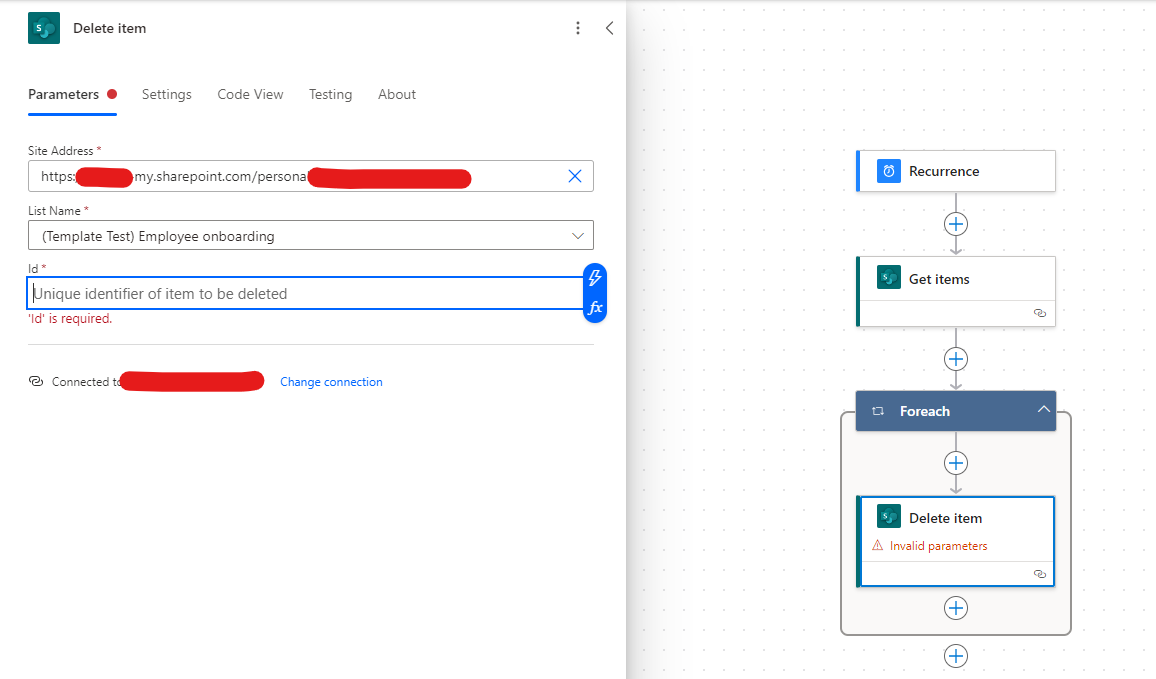
I am trying to build a flow that would remove all the information in a specific column as soon as the information get 4 weeks old. I attached a picture simply to show what I'm trying to achieve. I believe it's not a complicated flow, but it's my first time working with Power Automate so I'm probably missing some basic knowledge. I also have attached another screenshot of the flow I've built so far. I expected that I would be able to simply choose the "Description" column and that would be it. How should I proceed with the "Id" field? I'm confused about it means.
 
Thanks in advance for any insight!  


Helpful resources

Quick Links

Forum hierarchy changes are complete!

In our never-ending quest to improve we are simplifying the forum hierarchy…

Ajay Kumar Gannamaneni – Community Spotlight

We are honored to recognize Ajay Kumar Gannamaneni as our Community Spotlight for December…

Leaderboard > Power Automate

#1
Michael E. Gernaey Profile Picture

Michael E. Gernaey 503 Super User 2025 Season 2

#2
Tomac Profile Picture

Tomac 321 Moderator

#3
abm abm Profile Picture

abm abm 237 Most Valuable Professional

Last 30 days Overall leaderboard

Featured topics