web
You’re offline. This is a read only version of the page.
close
Skip to main content

Notifications

Announcements

Community site session details

Community site session details

Session Id :
Power Platform Community / Forums / Power Pages / Flows created with bas...
Power Pages
Unanswered

Flows created with basic license no longer visible on item after upgrading to premium

(1) ShareShare
ReportReport
Posted on by 6
With a basic license, I created a SharePoint site and flows (in personal environment) using a "For a selected (SharePoint) item" trigger. All the flows I developed worked as expected and were available for selection on the item(s). Since the successful development, I received a premium license (by being added to a specific AD group). When revisiting the site, any of the existing flows that I edit (personal environment) are no longer showing up as an option on item(s), and any new flows I develop are not available for use either. I tried making copies of the existing flows and updating/creating new connections, but it didn't result in any change. In the copied flows I would occasionally get errors such as "Unable to connect to a required endpoint. Power Platform now relies on a new cloud service dependency called Power Platform API. If you have conditional access policies or firewall rules, they may need to be updated to allow access to the necessary URLs. Please ensure the following domain is not blocked: *.api.powerplatform.com" or 
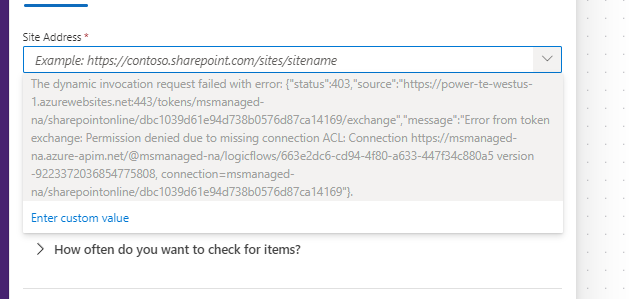
 
I am able to create other SharePoint sites and flows with no issue (personal environment). 
 
Has anyone else experienced this? It feels like my account needs some sort of "refresh" as if the SharePoint permissions looking for the basic account version and does not see that my current premium account version is the same account.
Categories:
I have the same question (0)
  • SaiRT14 Profile Picture
    1,990 Super User 2025 Season 2 on at
    1. If the flows are no longer appearing on the SharePoint items, simply edit and re-publish them. This can sometimes restore the connection between SharePoint and Power Automate.
     
    2. Ensure that your flows are shared with yourself or others who need to access them.
    • Go to My Flows, click on the ellipsis (…) for each flow, and select Share. Verify that your account has owner access to each flow.
    3. Open each flow and go to Connections.
    • Ensure that the connections (e.g., SharePoint, Office 365) are updated and authorized using your new premium license credentials.
    • If necessary, delete and re-add the connectors.
    Try above, let  me know if you still have issues. Thanks
  • acharlap Profile Picture
    6 on at
    Thank you for your response. 
     
    1. If the flows are no longer appearing on the SharePoint items, simply edit and re-publish them. This can sometimes restore the connection between SharePoint and Power Automate. I do not have the publish/re-publish option.
     
    2. Ensure that your flows are shared with yourself or others who need to access them.
    • Go to My Flows, click on the ellipsis (…) for each flow, and select Share. Verify that your account has owner access to each flow. I am the owner/developer of the flow and is in my "Shared with me" flows.
    3. Open each flow and go to Connections.
    • Ensure that the connections (e.g., SharePoint, Office 365) are updated and authorized using your new premium license credentials.
    • If necessary, delete and re-add the connectors. I created a completely new flow as well as trying to edit previously created flows prior to the post. Creating a new flow would have used new connectors. I also created new connectors on edited flows, but the issue remains.
     
    Issue still ongoing.

Under review

Thank you for your reply! To ensure a great experience for everyone, your content is awaiting approval by our Community Managers. Please check back later.

Helpful resources

Quick Links

Forum hierarchy changes are complete!

In our never-ending quest to improve we are simplifying the forum hierarchy…

Ajay Kumar Gannamaneni – Community Spotlight

We are honored to recognize Ajay Kumar Gannamaneni as our Community Spotlight for December…

Leaderboard > Power Pages

#1
Fubar Profile Picture

Fubar 89 Super User 2025 Season 2

#2
Jerry-IN Profile Picture

Jerry-IN 75

#3
sannavajjala87 Profile Picture

sannavajjala87 31

Last 30 days Overall leaderboard



