web
You’re offline. This is a read only version of the page.
close
Skip to main content
Community site session details

Community site session details

Session Id :
Power Automate - Building Flows
Unanswered

List Files in Sharepoint Document Library Folder

(0) ShareShare
ReportReport
Posted on by

I'm trying to list documents in my document library folder via flow. However, I'm return with the error below. I um unable to figure why it wasn't able to read the file path that was provided.
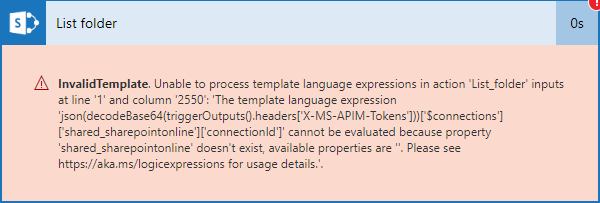
 

Below is the configuration made to list my folder.

I've tried using /content, /content/forms, GUID (of the folder)
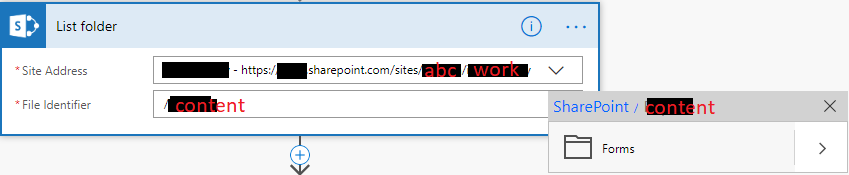

Would appreciate any enlightenment on this. Smiley Sad

I have the same question (0)
  • spsolutionsgrp Profile Picture
    297 on at
    Re: List Files in Sharepoint Document Library Folder

    Looks to be an issue with your connection.  Try to fix the conection or cry to create another connection to SharePoint.


    Please mark this as the solution if you find it helpful.

  • Mike_Guzowski Profile Picture
    219 on at
    Re: List Files in Sharepoint Document Library Folder

    Hey @Raphaella,

    That's a common issue but fortunately easy to resolve. Just click Test button on the top right corner of the flow editor and perform a test. You should be prompted to accept connectors config. Hit "Continue" and...THATS IT! 🙂


    Please mark my reply as solution if it helps you

  • v-yamao-msft Profile Picture
    on at
    Re: List Files in Sharepoint Document Library Folder

    Hi @Raphaella,


    As @spsolutionsgrp was saying, please try to recreate the connection and try again with it

    I have made a simple test and it is working fine.

    2.PNG1.PNG 


    Best regards,

    Mabel


  • Mike_Guzowski Profile Picture
    219 on at
    Re: List Files in Sharepoint Document Library Folder

    @v-yamao-msft: Are you sure recreating the connection will help? I'm quite sure I've done that without positive effect. Also please see following threads:

    https://powerusers.microsoft.com/t5/Building-Flows/property-shared-office365-doesn-t-exist/td-p/129667

    https://powerusers.microsoft.com/t5/I-Found-A-Bug/Unable-to-process-template-language-expressions-in-Custom/td-p/142950


    "I've gone as far as removing the O365 Users connection in the PowerApp and removing all remnants of it from the Flow. Still get the same message. I've re-linked the Flow to the icon a dozen times; no change. "


    Methods that works:

    1. Re-attach your connectors by testing your solution
    2. export -> import your solution
    3. build flow from scratch
  • spsolutionsgrp Profile Picture
    297 on at
    Re: List Files in Sharepoint Document Library Folder

    Try to create a copy of of the flow and on the copy see if your connection works.   I have done this in the past to fix strange errors but can't remember if it was the fix to your error.

Under review

Thank you for your reply! To ensure a great experience for everyone, your content is awaiting approval by our Community Managers. Please check back later.

Helpful resources

Quick Links

Responsible AI policies

As AI tools become more common, we’re introducing a Responsible AI Use…

Chiara Carbone – Community Spotlight

We are honored to recognize Chiara Carbone as our Community Spotlight for November…

Leaderboard > Power Automate

#1
Michael E. Gernaey Profile Picture

Michael E. Gernaey 614 Super User 2025 Season 2

#2
Tomac Profile Picture

Tomac 401 Moderator

#3
chiaraalina Profile Picture

chiaraalina 282

Last 30 days Overall leaderboard


