web
You’re offline. This is a read only version of the page.
close
Skip to main content

Announcements

News and Announcements icon
Community site session details

Community site session details

Session Id :
Power Platform Community / Forums / Power Pages / Power Pages not sendin...
Power Pages
Suggested Answer

Power Pages not sending email confirmation email after registration

(0) ShareShare
ReportReport
Posted on by 8
Steps: 
- Create a power page
-  Enable Local Sign In from Security section
-  Go for registration by providing email id, user name , password
-  Fill profile details
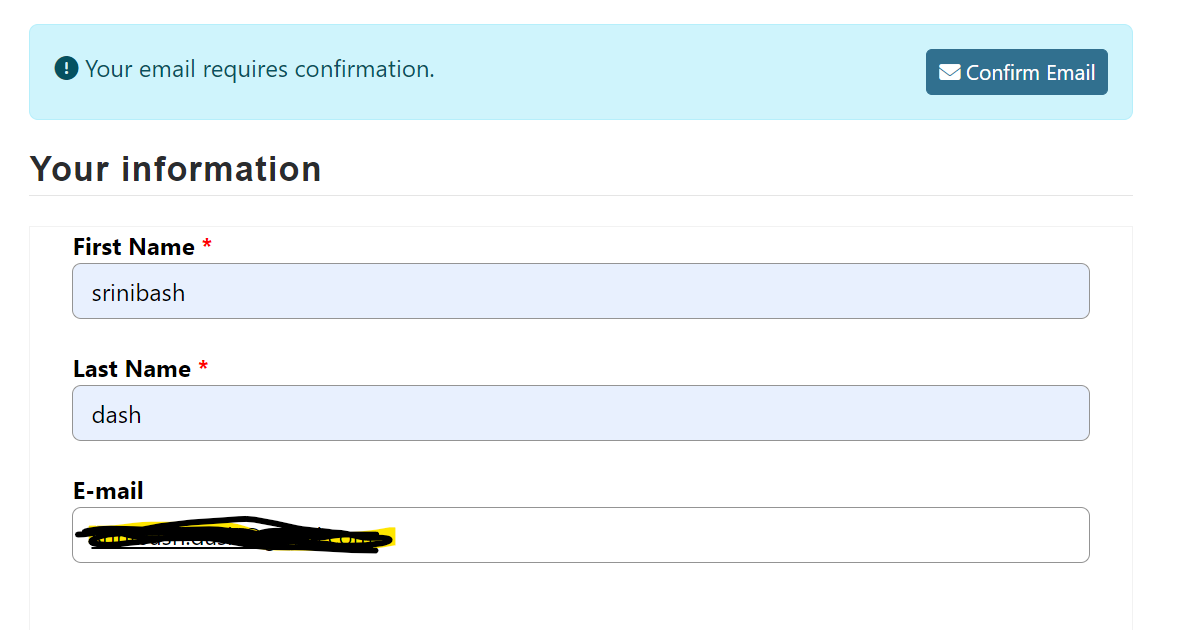
-  Click on Confirm email 
 
Expected:  Email should be received in provided email id. 
 
Actual :  not received any email to confirm 
 
can some one please help me out on this ?  
and apart from that I want to keep a * symbol for Email section. how I can do that ? 
Categories:
  • Suggested answer
    oliver.rodrigues Profile Picture
    9,482 Most Valuable Professional on at
    Hi, a few things here:
     
    • You should avoid using local authentication, Microsoft recommends using Azure AD B2C/Entra External
    • Local login is deprecated
    • The confirm email functionality triggers a classic workflow in dataverse called "Send Email Confirmation To Contact"
    • have you reviewed the sender of that e-mail? and configured mailbox and e-mail integration with your Dataverse?
  • SD-06011338-0 Profile Picture
    8 on at
    Hi Oliver,
    Thanks for the response. 
     
    I will configure Microsoft Entra External ID. 
    but just wanted to know when this Local Signin got deprecated, if any release notes from MS are there , it will be helpful. 
     
    and it will be a great help , if you can send me some more details to perform below steps..
     
    • The confirm email functionality triggers a classic workflow in dataverse called "Send Email Confirmation To Contact"
    • have you reviewed the sender of that e-mail? and configured mailbox and e-mail integration with your Dataverse?
     
    Thanks and Regards,
    Srini
  • Suggested answer
    ragavanrajan Profile Picture
    7,044 Most Valuable Professional on at
    Hi Srini, 

      Adding my few cents here. 

    Here is the official resource confirming the recommended authentication is Entra ID. 

    https://learn.microsoft.com/power-pages/security/authentication/set-authentication-identity?WT.mc_id=DX-MVP-5004934 

    With regards to the send email functionality. There was a bug reported last year. Not sure it was fixed. 

    But I have an article which can solve your problem. 

    https://ragavanrajan.medium.com/power-pages-password-reset-error-part-1-582ac1dd606d 
     
     
    Hope it helps.
    ------------
    If you like this post, give it a Thumbs up. Where it solved your request, Mark it as a Solution to enable other users to find it.


Under review

Thank you for your reply! To ensure a great experience for everyone, your content is awaiting approval by our Community Managers. Please check back later.

Helpful resources

Quick Links

Season of Sharing Community Challenge Winners!

Congratulations to our community stars!

Kudos to our 2025 Community Spotlight Honorees

Expanding mentorship, skilling, and AI innovation

Congratulations to the July Top 10 Community Leaders!

These are the community rock stars!

Leaderboard > Power Pages

#1
Mohsin Ali Profile Picture

Mohsin Ali 43

#2
sannavajjala87 Profile Picture

sannavajjala87 30 Super User 2026 Season 2

#3
11manish Profile Picture

11manish 20 Super User 2026 Season 2

Last 30 days Overall leaderboard


