web
You’re offline. This is a read only version of the page.
close
Skip to main content

Announcements

News and Announcements icon
Community site session details

Community site session details

Session Id :
Power Platform Community / Forums / Power Automate / Power Automate “Select...
Power Automate
Suggested Answer

Power Automate “Select” Action Error: “The ‘from’ property value is of type ‘String’

(1) ShareShare
ReportReport
Posted on by 4

Hi everyone,
I'm working on a Power Automate flow for a leave request process, and I’m running into an issue with the Select action. I’d appreciate any guidance on this.
Flow Overview:
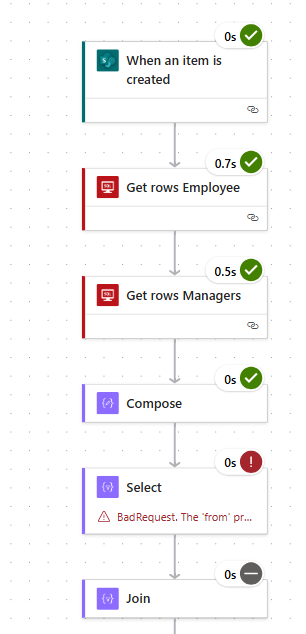


  • Trigger: When an item is created in a Microsoft List (contains fields like EmployeeCode, EmployeeName, DepartmentName, DateStarted, DateEnded)
  • Action - Get rows (V2) "Get rows Employee":
    Connects to on-prem SQL Server, table: Dim_Employees
    Filter Query:
  • EmployeeCode eq '@{triggerOutputs()?['body/EmployeeCode']}'
  • Action - Get rows (V2) "Get rows Managers":
    Reuses the same Dim_Employees table
    Filter Query:
  • DepartmentID eq @{body('Get_rows_Employee')?['value'][0]?['DepartmentID']} and RoleLevel eq 2
  • Action - Compose:
  • body('Get_rows_Managers')?['value']
  • Action - Select:
    From: @{outputs('Compose')}
    Map:
  • {
  •   "Email": "@{item()?['Email']}"
  • }
  • Action - Join:
    From: @{body('Select')}
    Join with delimiter: ;
Problem:
The flow fails at the Select action with this error:
“Action ‘Select’ failed: The ‘from’ property value in the ‘select’ action inputs is of type ‘String’. The value must be an array.”
However, when I check the output of the Compose step (body('Get_rows_Managers')?['value']), it clearly looks like an array of objects:
{
  "0.Email": "Yasuo@test.com",
  "1.Email": "Test@Test.com",
  ...
}
Here’s a simplified version of the output (some fields omitted for brevity):
0.EmployeeCode: 123
0.Email: Yasuo@test.com
1.EmployeeCode: 456
1.Email: Test@Test.com

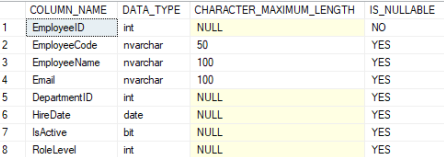
SQL Table Structure: I have included a screenshot of the Employees table structure


Any help or advice is greatly appreciated!
Thanks 

Categories:
I have the same question (0)
  • Chriddle Profile Picture
    8,686 Super User 2026 Season 1 on at
    However, when I check the output of the Compose step (body('Get_rows_Managers')?['value']), it clearly looks like an array of objects:
    {
      "0.Email": "Yasuo@test.com",
      "1.Email": "Test@Test.com",
      ...
    }
     
    This is not an array.
    At first glance it looks like an object, but according to the error message, it's not valid JSON at all.
     
    In doubt check the Compose's output with a JSON validator.
  • jen_raff_91 Profile Picture
    29 on at
    Why not skip the compose action and in the Select action your input will be the Get Managers action
  • Suggested answer
    Vejai SH Profile Picture
    560 on at
     
    "Select" Action requires a array object. if Get rows (V2) "Get rows Managers" returns a array, then you should use this in select. if not then you need to build a array to perform.
     
    Thanks,
    Vejai SH
  • LĐ-02060146-0 Profile Picture
    4 on at
    hi @Vejai SH and @jen_raff_91, the reason why i put the compose action there was to make sure it returns the right output as the get rows action doesn't reveal the output during test. I tried it aswell but same error occured. Do you have any suggestion on how i may build an array to match the input requirement of the SELECT activity?

Under review

Thank you for your reply! To ensure a great experience for everyone, your content is awaiting approval by our Community Managers. Please check back later.

Helpful resources

Quick Links

Introducing the 2026 Season 1 community Super Users

Congratulations to our 2026 Super Users!

Kudos to our 2025 Community Spotlight Honorees

Congratulations to our 2025 community superstars!

Congratulations to the April Top 10 Community Leaders!

These are the community rock stars!

Leaderboard > Power Automate

#1
Vish WR Profile Picture

Vish WR 784

#2
Valantis Profile Picture

Valantis 581

#3
Haque Profile Picture

Haque 545

Last 30 days Overall leaderboard



