web
You’re offline. This is a read only version of the page.
close
Skip to main content

Announcements

News and Announcements icon
Community site session details

Community site session details

Session Id :
Microsoft Power Up Program Community
Answered

PowerBi Slicer not working

(1) ShareShare
ReportReport
Posted on by 24

Hi everyone,

I'm facing an issue with my Power BI report where the date slicer correctly filters rescued animals based on their Arrival Date, but it doesn’t work as expected for Foster Date.

Here’s what I’ve done so far:


  • I created a DimDate table and linked it to my Animal Shelter table.

  • The slicer is set up to show data for the last month and last 3 months.

  • It works fine for the Arrival Date, but the Foster Date doesn’t filter properly.

I suspect this could be a relationship issue, as Power BI allows only one active relationship between tables. How can I ensure that the slicer filters both Arrival Date and Foster Date correctly? Should I use USERELATIONSHIP in a measure, or is there a better approach?

Any guidance would be greatly appreciated! Thanks in advance. 😊
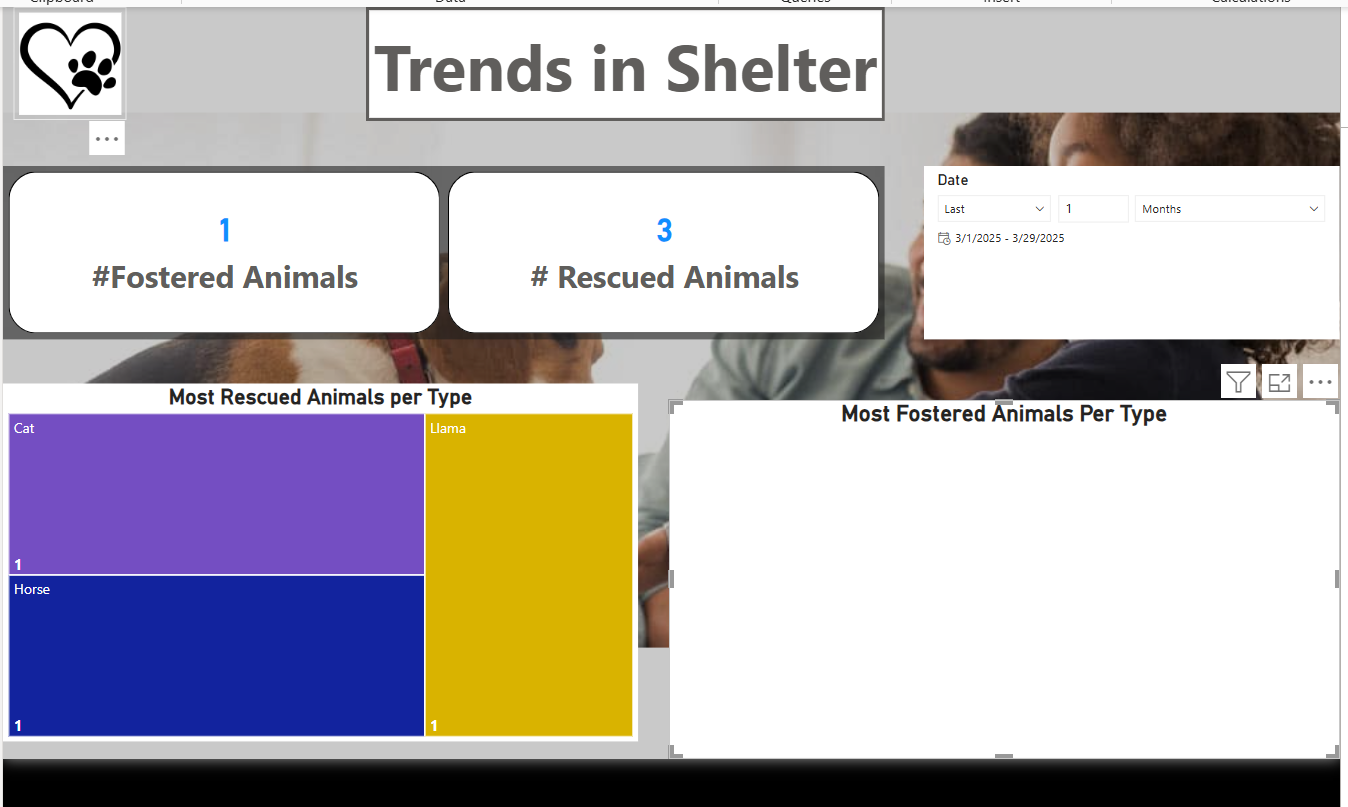
Screenshot 2025-03-29 151144.png
Categories:
I have the same question (0)
  • Suggested answer
    w.p Profile Picture
    8,345 Super User 2026 Season 1 on at
    With this dashboard, you don't need the dimDate table.
    Removing the relationship from the table should fix the issue.
  • CU23111850-0 Profile Picture
    24 on at
    I removed all the relationships and used the date of arrival for the date slicer but, I am still having bigger issues in my date of foster because its not showing the correct number either in the visual nor the count of fostered however when I select like older duration (since the shelter opens it gives me the correct total some how  @w.p
  • Suggested answer
    w.p Profile Picture
    8,345 Super User 2026 Season 1 on at
    Can you share the setting screenshots of the most fostered animals per type.

    UPDATE: You need to set 2 different slice filters, one for date of arrival and the other for date of foster and you need only 1 Treemap visual.

  • CU23111850-0 Profile Picture
    24 on at
    why it will be hard to set up and confusing this is working except for the last month or 3 month when select the whole duration it gives me correct count and data


  • Verified answer
    w.p Profile Picture
    8,345 Super User 2026 Season 1 on at

    You need to modify the data to be able to answer the challenge questions.
    Hints: last date of arrival is 2024.

    It can be done if you prefer to have 2 Treemap visuals, but it requires additional steps.
    When you change the filter for either date of arrival or foster, it will affect other visuals. To limit this filter, you need to set other visuals to none via the Edit Interactions in the Format ribbon.

  • CU23111850-0 Profile Picture
    24 on at
    It worked with 2 slicers after lots of efforts I really appreciate you help please connect: https://www.linkedin.com/in/manar-hamid/, thanks
  • w.p Profile Picture
    8,345 Super User 2026 Season 1 on at
    grad it works out for you.
    sorry, no linked-in.

Under review

Thank you for your reply! To ensure a great experience for everyone, your content is awaiting approval by our Community Managers. Please check back later.

Helpful resources

Quick Links

Forum hierarchy changes are complete!

In our never-ending quest to improve we are simplifying the forum hierarchy…

Ajay Kumar Gannamaneni – Community Spotlight

We are honored to recognize Ajay Kumar Gannamaneni as our Community Spotlight for December…

Leaderboard > Microsoft Power Up Program Community

#1
timl Profile Picture

timl 49 Super User 2026 Season 1

#2
Vish WR Profile Picture

Vish WR 29

#3
Haque Profile Picture

Haque 17

Last 30 days Overall leaderboard

Featured topics

Introduce yourself!



