web
You’re offline. This is a read only version of the page.
close
Skip to main content
Community site session details

Community site session details

Session Id :
Power Platform Community / Forums / Power Apps / Email Filtering Data C...
Power Apps
Unanswered

Email Filtering Data Card Value

(0) ShareShare
ReportReport
Posted on by 36

In my IT request application, there are two approvers: one is the Head of Department (DataCardValue9), and the second is the Admin Department (DataCardValue10).

I need to display only 7 users (O365 Email) in the Head of Department (DataCardValue9) and 2 users (O365 Email) in the Admin Department (DataCardValue10).
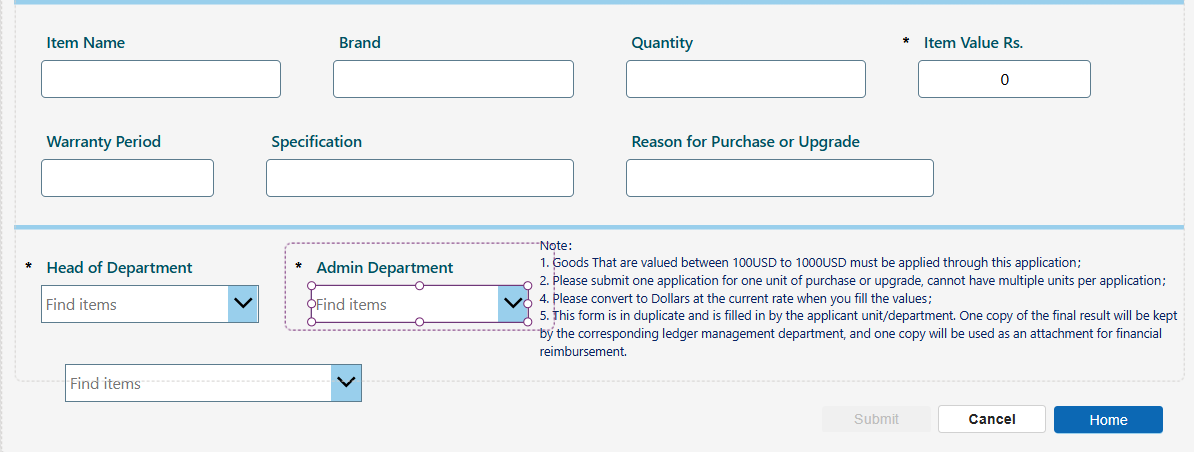
 

I have used this code to filter emails.

 
Filter(Choices(['CHEC IT Facility Request'.'Head of Department'),Email in ("email1@outlook.com, email2@outlook.com...., email7@outlook.com"))

But in this code, some emails do not appear in the list, and searching does not work. please help me to fix this 

Categories:
I have the same question (0)
  • Verified answer
    timl Profile Picture
    36,319 Super User 2025 Season 2 on at
    Email Filtering Data Card Value
    Hi  WW-25090315-0
     
    I suspect the cause of this is because you've use round brackets rather than square brackets to provide the list of email addresses. Does this make a difference?
     
    Filter(
        Choices(['CHEC IT Facility Request'].'Head of Department'),
        Email in ["email1@outlook.com", "email2@outlook.com", ..., "email7@outlook.com"]
    )
     
  • WW-25090315-0 Profile Picture
    36 on at
    Email Filtering Data Card Value
    Fixed with below code 
    Items =
    Filter(
        Office365Users.SearchUser({searchTerm: DataCardValue9.SearchText, top: 999}),
        Find("Display Name", DisplayName) > 0 || Find("Display Name", DisplayName) > 0 || Find("Display Name", DisplayName) > 0  
    )
     
    Update =
    {
    Claims: "i:0#.f|membership|" & Lower(DataCardValue9.Selected.Mail),
    DisplayName: DataCardValue9.Selected.DisplayName,
    Email: DataCardValue9.Selected.Mail,
    Department: "",
    JobTitle: "",
    Picture: ""
    }

Under review

Thank you for your reply! To ensure a great experience for everyone, your content is awaiting approval by our Community Managers. Please check back later.

Helpful resources

Quick Links

Forum hierarchy changes are complete!

In our never-ending quest to improve we are simplifying the forum hierarchy…

Ajay Kumar Gannamaneni – Community Spotlight

We are honored to recognize Ajay Kumar Gannamaneni as our Community Spotlight for December…

Leaderboard > Power Apps

#1
WarrenBelz Profile Picture

WarrenBelz 757 Most Valuable Professional

#2
Michael E. Gernaey Profile Picture

Michael E. Gernaey 322 Super User 2025 Season 2

#3
MS.Ragavendar Profile Picture

MS.Ragavendar 209 Super User 2025 Season 2

Last 30 days Overall leaderboard


